The
table below details important information relevant to each Junos OS
release. The dates and milestones provided are in accordance with the
policies at the time of each software release and are in accordance with
stated End of Life/End of Support policies for Juniper Networks.
Simplified interconnect for large scale DC fabric infrastructures with seamless EVPN-VXLAN tunnel stitching
Enabling larger EVPN-VXLAN data center infrastructure can be a
scaling challenge, requiring additional tools to fully control the way
workloads communicate across fabric pods or DC sites. Starting with
Junos OS release 20.3, seamless EVPN-VXLAN stitching offers a method to
interconnect pods and sites at their edges that provides improved
control and scaling.
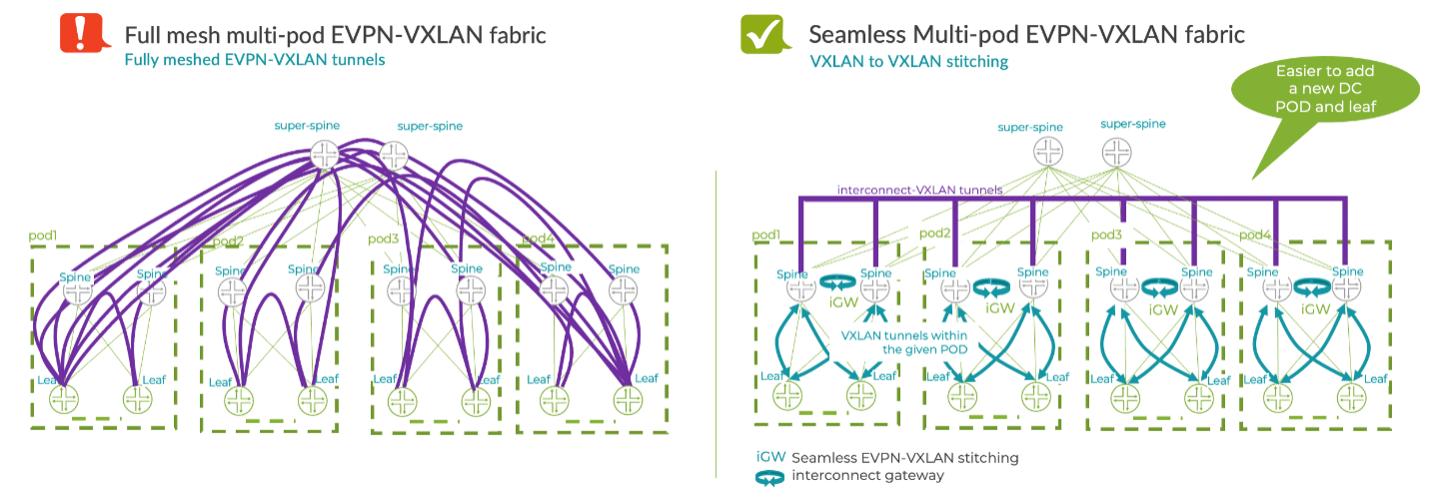
The figure below shows a data center with four pods. The left side
shows an approach that interconnects pods using a full mesh of
leaf-to-leaf VXLAN tunnels. The right side uses EVPN-VXLAN stitching,
where the intra-pod tunnels terminate at their local interconnect
gateway and then just a few VXLAN tunnels are used to interconnect the
pods. In this example, tunnel stitching happens at the spine layer,
however it can also be done at the super-spine or border-leaf layer,
depending on the DC design.
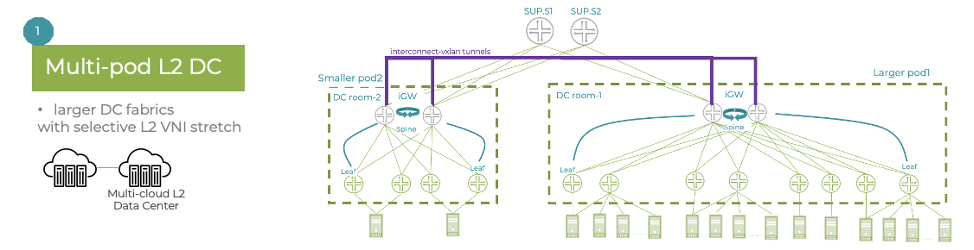
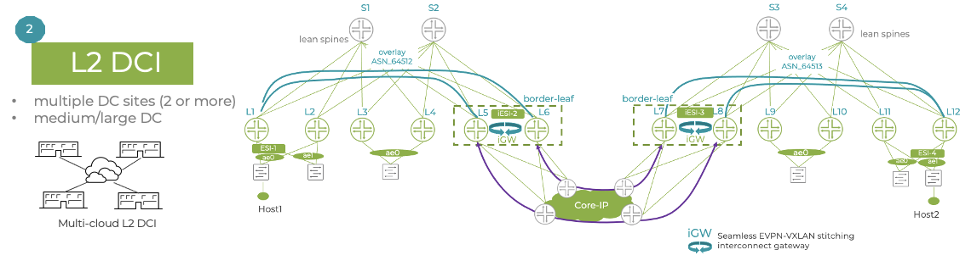
Seamless EVPN-VXLAN stitching has two main use cases:
Multi-pod DC fabric architectures – the interconnect gateways are placed at the spine layer, unifying scaling between the two pods.
Data center interconnect (DCI) – instead of using an
over-the-top (OTT) full mesh between sites, the interconnect gateways
create the DCI interconnect VXLAN tunnels, thus reducing the number of
tunnels and next-hops.
Seamless EVPN-VXLAN stitching simplifies Layer 2 DCI and multi-pod
architectures by providing clear demarcation points between pods and
sites, thereby enabling improved flood control. As a result, this
solution offers better overall scaling.
Improved virtualization and multitenancy with MAC-VRF
Leveraging and implementing virtualization and multitenancy in the
data center can be complex, requiring multiple touch points in the
architecture to see the first benefits of virtualization.
A new routing instance type, MAC-VRF, adds more flexibility when
enabling new server connectivity within the fabric. And with support for
edge-routed bridging (leaf routed) and bridged overlay (routed outside the fabric) architectures, MAC-VRF offers a consistent approach to enabling L2 services.
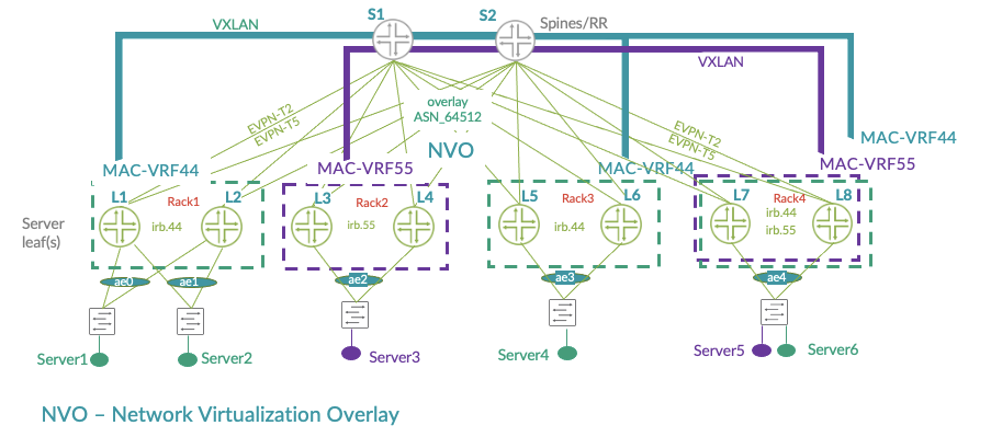
In the figure below, Tenant 44 (MAC-VRF44) and Tenant 55 (MAC-VRF55)
are using dedicated MAC-VRF Layer 2 instances on the leaf devices,
enabling them to be fully isolated from each other. In cases where these
tenants want to communicate, they can add dedicated EVPN Type-5 Layer 3
instances (not shown) to interconnect. This provides the tenants with a
range of options to support both their isolation and collaboration
needs.
Overall, the MAC-VRF provides additional capabilities for network
virtualization and multitenancy. It also offers better control of VXLAN
tunnel distribution as well as VXLAN tunnel distribution and flooding
optimizations. Plus, it enables interoperability with other vendors.
Application awareness and traffic steering with filter-based forwarding
Not all traffic is equal. When deploying applications in a data
center, some applications require more special treatment than others,
whether it’s due to how much we trust their traffic or because of the
volume of traffic they generate. When these applications are located
within the same subnet it can be challenging to provide differentiation.
Something is needed to identify and separate each application’s
traffic.
Filter-based forwarding (FBF) can help. FBF may not be new, but
applying it to edge-routed bridging architectures injects more
intelligence into the DC fabric. FBF on QFX5120 leaf nodes enables the
operator to forward each application’s traffic as they wish. This makes
it possible to enable app steering during a specific time of day, or if a
particular app/server begins to show suspicious behavior from a
security point of view.
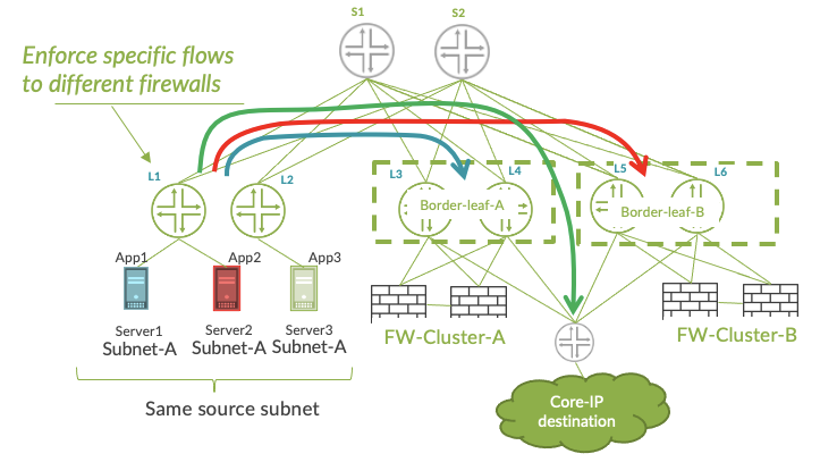
In the figure below, three servers have been deployed in the same IP
subnet and by default, their traffic will all be treated the same.
However, each server’s traffic has different characteristics: App1 is
creating a lot of ‘elephant’ traffic; App2 has low volume but its
traffic needs to flow through a specific firewall cluster for more
advanced policing; and App3 generates lots of traffic but it’s fully
trusted so can flow directly out to the core IP network.
Using filter-based forwarding at the leaf layer adds application
awareness of the data center fabric. It also improves load balancing and
flow engineering capabilities and offers improved flow isolation.
Improved fabric hardening with enhanced Ethernet loop detection
Modern data center EVPN-VXLAN fabrics have eliminated many of the
challenges of traditional 3-tier architectures, such as loop detection.
One such challenge is loop detection and prevention. Leaf-spine
architectures use all-active link designs and EVPN includes several
built-in mechanisms (split horizon, designated forwarder election, MAC
mobility tracking) that lower the risk of network instability, compared
to legacy Spanning Tree-based infrastructures.
Still, loops can happen when server-to-leaf connections are
mis-cabled or misconfigured. Since uptime is a critical metric for any
data center, many vendors still recommend using STP. Yes, STP in a
modern DC! Fortunately, there’s a better way.
Starting with Junos OS release 20.4, the QFX5120 supports
connectivity fault management (CFM) into the DC fabric. Based on the
IEEE 802.1ag standard, CFM’s heartbeat mechanism provides enhanced
Ethernet loop detection over legacy options like xSTP and BGP. But
that’s not all. Through information-sharing within the QFX platform,
EVPN can provide information to CFM TLVs like node name, port name and
ESI information to help identify the source of the problem.
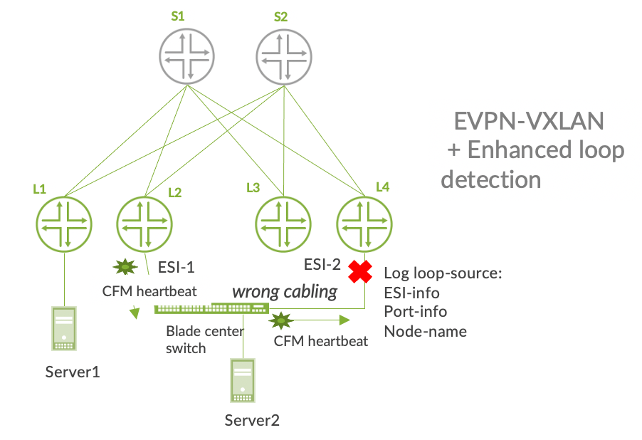
In the figure below, Server 2 is connected to leaf devices L2 and L4.
Both leaf devices are using the same trunk-level VLAN ID. however they
have accidentally been configured to use different ESI values. This
could create an Ethernet loop. But thanks to CFM heartbeats, the loop
has been blocked. Plus, because CFM TLV extensions include details about
the problem, the origin of the loop can be identified.
This solution represents a more elegant approach for loop detection
within an EVPN-VXLAN fabric, truly eliminating the need for legacy loop
detection solutions like xSTP. It also reduces loop detection times and
enhances visibility into the cause of the issue, thereby reducing time
to resolution.
Juniper provides this document as a means to help customers and Juniper manufacturing select a Junos software version that aligns with their deployment needs. The releases listed below have performed well for the general population, but note that due to the uniqueness of our customer network deployments to include areas such as design, traffic patterns/flows, and specific usage of features and functionality, Juniper recommends that all customers A) read the associated Release Notes to understand how features, functionality, fixes, and any known outstanding issues may apply to your specific network and applications, and B) test and certify the suggested code version(s) to ensure they will perform as expected in your network.
This article applies to the following devices:
EX Series
M, T, and MX Series
ACX Series
NFX Series
QFX Series
SRX Series
For other Junos devices, refer to the Release Notes and the Alerts column on the Download Software pages.
Notes:
The software versions included in this article are selected by utilizing input from Juniper Engineering, customers, and analysis of field usage data.
To be automatically notified of updates to this document, use the Subscribe link. If you do not see the Subscribe link, log in with your user account.
Juniper Networks offers optional fee-based services to further aide customers in selecting and testing software releases. If interested in more information, please contact your Juniper Sales Representative to discuss offering details and pricing.
SYMPTOMS:
For use by customers and Juniper manufacturing planning an upgrade or initial installation.
Exceptions for evaluating these suggested software versions include:
A Juniper Engineer has recommended that a customer use a specific version of Junos software that is different from what is listed here in this article.
You require specific features (Feature Explorer) that are available only in another version of Junos software. In that case, be sure to download the latest maintenance release.
Your currently installed version of Junos is meeting your requirements as is.
If you use NSM, refer to the NSM & Junos Compatibility Matrix to make sure the suggested Junos software version can be managed by NSM.
To see features supported per specific Junos versions, please go the Juniper Pathfinder page and navigate to "Feature Explorer": https://apps.juniper.net/home/
SOLUTION:
To download Junos Software, go to the Software Download site and find your product.
Suggested Junos Software Versions for your consideration and evaluationare listed in the tables below.
NOTE: To locate a Junos release containing an 'S' (i.e. Junos 17.3R3-S3), on the Software Download product page change the OS drop-down from Junos to Junos SR
If someone could arrange a competition between different physical
network topologies, the spine-and-leaf fabric would reign as the
undisputed champion in many ways. What is different about the
spine-and-leaf that would declare this type of network topology “the
champion?”
The spine-and-leaf is a special kind of network, called a fabric,
with some interesting mathematical properties. One of the most
interesting, from a design perspective, is that fabrics are regular,
which means they are built out of what some may call “micro-modules”—
clearly repeatable sections of the network topology. These repeating
sections of the network topology are not directly related to traditional
modules built around creating failure and security domains, but they
still enable some interesting properties related to the design and
management of a data center network.
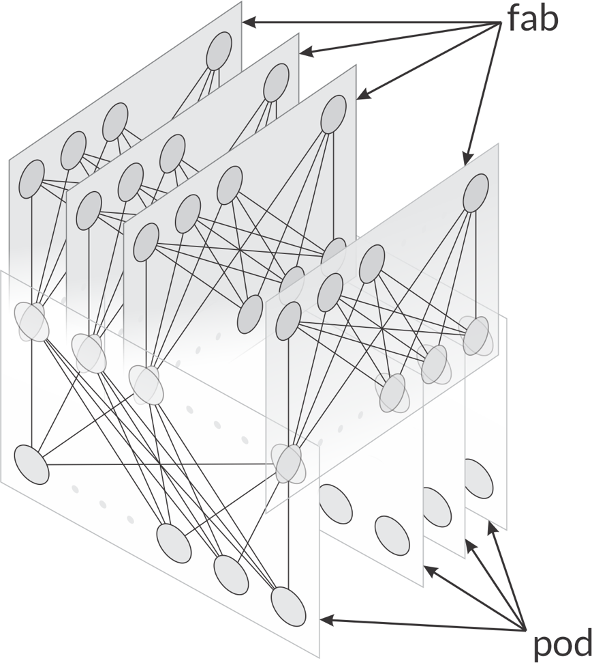
Many five-stage fabric designs easily lend themselves to breaking the
network up into fabs and pods, as shown in the illustration below. Any
fab or pod can be replaced without impacting the overall fabric design
much like an access layer module in a traditional three-layer
hierarchical design.
The repeatability of these modules enables automation, just as any
other modular network design does. New pods can be added to the fabric
and measured while the load is slowly moved onto them to ensure they are
operating correctly—all while the fabric is in production. This is
called a canary and allows the operator to add or replace network elements at the pod or fab level while controlling risk.
Because pods and fabs can be replaced in this way, they can also be managed in generations,
or a repeatable set of hardware, software, configurations and tools. By
controlling the number of generations within the fabric, the operator
can directly control one of the many elements of network complexity—the
variability of configurations.
The spine-and-leaf is also a universal topology, which means it can
optimally support just about every kind of traffic flow on a single
physical topology. This enables several types of applications, including
applications with extremely hard performance requirements, to run
efficiently across a spine-and-leaf fabric.
While the spine-and-leaf is a fascinating kind of network topology,
many network engineers are still unaware of (or not fully aware of) the
many interesting aspects of this network design, its origin and its
properties.
Experience
is the new uptime. The network for the next decade is revolutionizing
enterprise networks with AI-driven automation, actionable insights, and
the agility plus elasticity of a microservices cloud.
It applies artificial intelligence
and data science tools to deliver optimized experiences and simplified
network operations. Traditional wired and wireless LAN solutions are
built on antiquated architectures that lack the scale, reliability and
agility needed to address today’s diverse enterprise needs.
Leveraging this solution, IT teams can streamline operations and
simplify user and device troubleshooting, while delivering innovative
and strategic projects with IoT and location services.
Transform IT with AI-driven operations and support
Artificial
intelligence technologies are adopted in multiple business areas and
network operations is no exception. The need to resolve complex network
issues, prevent threats and grow business all lend themselves to AI. At
Juniper, our solutions, driven by Mist AI, are proven to simplify
network complexity and empower your network to more autonomously support
your business over the next decade.
The Conversational AI engine:
Marvis leverages a rich data science toolbox to implement algorithms
such as mutual information, decision trees, reinforcement learning, and
natural language processing. It understands user intent and proactively
resolves network and client problems so IT teams spend less time
looking for root cause. Juniper employs Marvis to tackle our customers’
trouble tickets in our own AI-driven support model. Each support ticket
that comes is processed with Marvis, allowing our data science and
support teams to work together to improve and retrain Marvis. This model
improves the efficacy of Marvis creating a feedback loop between our
customers, support, and data science teams. Due to this support model
customers using Marvis frequently see a drop of 40% to 90% in user generated trouble tickets.
Assurance for Wired, Wireless and WAN:
An essential part of our cloud services portfolio that leverages
multiple Machine Learning algorithms to optimize network performance,
simplify operations, streamline troubleshooting and provide visibility
into user experience.
HealthBot:
A highly automated network analytics solution that collects,
aggregates, and analyzes large volumes of real-time telemetry data to
provide a multidimensional view of device, network and service health.
It offers various machine learning algorithms, which provide anomaly and
outlier detection, as well as predictive behavior analysis for future
device or network-level behavior.
Juniper Advanced Threat Prevention (ATP):
Finds and blocks both known and unknown cyber threats by leveraging
static and dynamic malware analysis coupled with machine learning
algorithms. The ATP Cloud malware detection pipeline takes advantage of
machine learning to correlate malware with the results of antivirus
scans, static analyses, and dynamic analyses.
Location Services:
Juniper’s AI-Driven Location-Based Service integrates enterprise-grade
virtual Bluetooth LE (vBLE) and IoT with Wi-Fi to deliver the industry’s
most accurate and scalable services, including User Engagement, Asset Visibility, and Contact Tracing.
It leverages the Mist AI and cloud-based machine learning to bring new
values to wireless networks through personalized location services
while providing unparalleled user experiences.
Juniper provides this
document as a means to help customers and Juniper manufacturing select a
Junos software version that aligns with their deployment needs. The
releases listed below have performed well for the general population,
but note that due to the uniqueness of our customer network deployments
to include areas such as design, traffic patterns/flows, and specific
usage of features and functionality, Juniper recommends that all
customers A) read the associated Release Notes to understand how
features, functionality, fixes, and any known outstanding issues may
apply to your specific network and applications, and B) test and certify
the suggested code version(s) to ensure they will perform as expected
in your network.
This article applies to the following devices:
EX Series
M, T, and MX Series
ACX Series
NFX Series
QFX Series
SRX Series
For other Junos devices, refer to the Release Notes and the Alerts column on the Download Software pages.
Notes:
The software versions included in this article are selected by
utilizing input from Juniper Engineering, customers, and analysis of
field usage data.
To be automatically notified of updates to this document, use the
Subscribe link. If you do not see the Subscribe link, log in with your
user account.
Juniper Networks offers optional fee-based services to further
aide customers in selecting and testing software releases. If interested
in more information, please contact your Juniper Sales Representative
to discuss offering details and pricing.
Symptoms:
For use by customers and Juniper manufacturing planning an upgrade or initial installation.
Exceptions for evaluating these suggested software versions include:
A Juniper Engineer has recommended that a customer use a specific
version of Junos software that is different from what is listed here in
this article.
You require specific features (Feature Explorer)
that are available only in another version of Junos software. In that
case, be sure to download the latest maintenance release.
Your currently installed version of Junos is meeting your requirements as is.
If you use NSM, refer to the NSM & Junos Compatibility Matrix to make sure the suggested Junos software version can be managed by NSM.
To see features supported per specific Junos versions, please go the
Juniper Pathfinder page and navigate to "Feature Explorer": https://apps.juniper.net/home/
Solution:
To download Junos Software, go to the Software Download site and find your product.
Suggested Junos Software Versions for your consideration and evaluationare listed in the tables below.
NOTE: To locate a Junos release containing an 'S' (i.e. Junos 17.3R3-S3), on the Software Download product page change the OS drop-down from Junos to Junos SR
It is highly recommended to refer to the Release
Notes, Technical Documentation, and KB articles for any outstanding and
resolved issues before making the upgrade decision. Contact JTAC if
there are any queries.
Please refer to TSB16758 for minimum software requirements for newer revision EX8200 linecards.
This includes subscriber management deployments that incorporate services such as CGNAT, etc.
This release is also suggested for deployments that include both MS-MPC/MIC and MS-DPC modules within the same chassis.
See KB33938 for detail information and directly downloadable links to software for M/MX/PTX/T-Series JUNOS Software
Recently released hardware may require a software version newer
than listed above. Please use the latest Service Release for the
required JUNOS software version
Due to feature parity recommended from Product Line Management
TSB17655 -
On SRX5000 series with SRX5k RE-13-20 a software upgrade to Junos
release 12.3X48-D80, D85 or D90 may fail the pre-check due to
insufficient space available on the compact flash.
Notes for upgrading from Junos 15.1X49 releases to 18.4R3 or 18.4R3 based Service Releases:
Junos OS upgrade from 15.1X49 directly to 18.4R3 or 18.4R3 based
Service Releases is supported for all SRX platforms. Exception: SRX5k is
unable to upgrade directly from Junos 15.1X49 releases to 18.4R3-S2 or
18.4R3-S3 (PR1505864). This issue is resolved in 18.4R3-S4.
For vSRX the following limitations apply when upgrading from 15.1X49 directly to 18.4R3 or 18.4R3 based Service Releases:
The file system mounted on /var usage must be below 14% of capacity.
Check this with root@vsrx> show system storage | match " /var$"
/dev/vtbd1s1f 2.7G 82M 2.4G 3% /var
Note: The CLI command ‘request system storage cleanup’ may help reach that percentage if needed
The Junos upgrade image must be placed in the directory /var/host-mnt/var/tmp/ request system software add /var/host-mnt/var/tmp/
It is recommended to deploy a new vSRX VM instead of performing a
Junos upgrade. That also gives the option to move from vSRX to the newer
and more recommended vSRX 3.0.
ISSU is not supported when upgrading from Junos 15.1X49 to higher versions.
KB34945
- When Junos Space Security Director is used for managing the SRX
configuration and the AppFW, IDP or UTM features are used, then when
upgrading to Junos 18.2R1 or higher, the SRX configuration needs to be
migrated to the new Unified Policies style and Security Director version
19.3 or higher is required.
Starting with Junos OS Release 17.3, when you upgrade from Junos OS
Release 15.1X49 to Junos OS Release 17.3 or higher, or downgrade from
Junos OS Release 17.3 or higher to Junos OS Release 15.1X49, you must
update the IPS signature package by downloading and installing the IPS
signature package update.
When upgrading from Junos 15.1X49-D170 to Junos 18.4 releases, the
following features are unavailable in 18.4 Junos code version:
The following CSO / SD-WAN related features:
Application quality of experience (AppQoE) application-based multipath support (SRX Series and vSRX)
This feature is available as of 15.1X49-D160 code line and 19.2R1 and higher releases
Application quality of experience (AppQoE) increased scaling support (SRX4100, SRX4200)
This feature is available as of 15.1X49-D160 code line and 19.1R1 and higher releases
Application quality of experience (AppQoE) support in high availability mode (SRX4100, SRX4200)
This feature is available as of 15.1X49-D160 code line and 19.1R1 and higher releases
MPLS based traffic flow security processing via virtual routing
and forwarding (VRF) instances (SRX300, SRX320, SRX340, SRX345, SRX550M,
SRX1500, SRX4100, SRX4200, and vSRX)
This feature is available as of 15.1X49-D160 / 15.1X49-D170 code line and 19.3R1 and higher releases
MPLS based traffic flow security processing linking of multiple VRFs to a vrf-group (SRX Series and vSRX)
This feature is available as of 15.1X49-D170 code line and 19.3R1 and higher releases