Migrating your data to the cloud can be a daunting task
if your enterprise doesn’t adequately prepare for it. Cloud migration
can be a lengthy process, and it requires a large time and financial
investment from your company to fulfill. Without a well thought-out
migration strategy in place, your business will have a tough time
adopting the cloud into your infrastructure.
How do you design a successful cloud migration strategy? What are the key factors of cloud migration
that this strategy should address? Most importantly, how does your
business achieve the cloud migration goals you’ve set out? Below, we
list several tips for creating and executing a successful cloud
migration strategy.
Understand why you want to migrate to the cloud
First things first: why do you want to
move your enterprise’s data and workflows to the cloud? The cloud is an
exciting technology that businesses want to take advantage of. However,
without a clear reason behind adopting the cloud into your
infrastructure, your cloud migration is destined to crash and burn. Your
enterprise needs to understand what it seeks to accomplish by moving to
the cloud. Whether it be to reduce costs or to take advantage of
cloud-based services, your cloud goals allow you to design your
migration strategy around your specific business needs.
Know what data should be included in your migration strategy
Your business doesn’t necessarily need to
move all of its data onto the cloud. If you want to take advantage of
the computing power the cloud provides to build powerful applications
and solutions, for example, you won’t need to migrate your legacy
business data over. Alternatively, businesses that want to use the cloud
for data storage must consider which bits of data should remain
on-premise and which should be exclusively in the cloud.
Plan your cloud migration in stages
Fully migrating your data to the cloud
can take a long time, especially for enterprises that store a ton of
data in their infrastructure. Because it takes so long to move this
data, your migration strategy should move data onto the cloud in stages.
Non-essential data should be migrated first because you’ll likely be
unfamiliar with the cloud environment you’re migrating to. If you
attempt to migrate mission-critical or sensitive data first and
something goes wrong (such as accidentally leaking your data), it can be
costly to your business.
Evaluate your migration strategy after a while
After you’ve started migrating data over,
it’s a good idea to look at your migration strategy and see if it’s
working for your company. This evaluation can include how much of the
migration is complete and when you expect it to be finished if you work
at your current pace. Examining your cloud migration strategy can help
your enterprise understand how well your company is achieving its cloud
goals.
Keep your employees up to speed
When you move to the cloud, you’ll need
to train your workforce on an entirely new deployment. It’s fair to
assume that many of your staff do not use cloud solutions and
environments. They can be a roadblock for successful cloud operation,
especially if they aren’t familiar with your cloud migration plan. Make
sure that your employees are familiar with your cloud migration strategy
and what your short-term and long-term goals are.
Juniper Networks has a distinguished record as a disruptor and a change leader in the networking industry.
Juniper technologies helped fuel the rapid growth of
the internet in the early 2000s by decoupling the data-plane of an IP
router from its control plane and creating routers that moved IP traffic
many times faster and more economically than before. Junos OS,
the software brain of Juniper routers, switches and security
appliances, integrated market-leading innovation into an open-source
Unix OS, namely FreeBSD. Among other things, Junos introduced innovative
ways of managing network devices, leading to standardized modeling
languages and protocols, such as YANG and NETCONF, laying the foundation
for programmability and automation that the industry has broadly
adopted today.
More recent innovations include virtualization, node slicing and the ability to support 3rd-party
white box hardware, to name a few. Furthermore, Juniper consistently
maintains a strong presence in standards bodies evangelizing open
programmability to ensure freedom of choice for the entire networking
industry.
The networking industry is in transition again with
cloud, 5G and SDN creating new challenges, as well as opportunities.
These, in turn, require new network architecture approaches. Juniper’s
engineering team has been busy designing software infrastructure to
enable new paradigms such as scale-out architectures, disaggregated and
cloud-native functions, lean and open-source compliant OS stacks, as
well as the ability to offer much greater availability, programmability,
visibility, feature development and deployment agility for operational
efficiencies in traditional deployment models. This effort has produced a
new generation of infrastructure evolution within Junos, sometimes
referred to as “Junos OS Evolved,” that imbues powerful capabilities to
the overall Junos operating system while maintaining One Junos
experience.
New Capabilities The latest Junos release incorporates the following capabilities:
Linux OS and Linux native application
components enable the user to leverage the integrated tooling and
operational mechanisms of the rich Linux open-source community
Logically centralized state database and a
publish/subscribe state distribution system for advanced observability,
troubleshooting and remediation
Model representation of the entire config and state, enabling machine-driven automation
Full software modularity with strong fault isolation boundaries for higher availability
Containerized OS components with patching and
upgrade capability for availability and run-time upgrades of on-device
software, as well as the ability to run software decoupled from hardware
in cloud-native environments
Native support for 3rd-party software agents enabling easy customization
Next generation data-plane software sub-system with a programmable and open API
Powerful and intrinsic distributed system
facility for enabling new paradigms such as distributed chassis and
cloud-hosted control planes
As software evolves, especially when it is
deployed on hundreds of thousands of devices around the globe, an
ecosystem of operational experiences, best practices, management tools
and trust also evolves around it. At Juniper, we realize the importance
of preserving the One Junos experience by keeping the following aspects
consistent across our releases:
System and application data models and interfaces via SNMP, CLI, NETCONF, Streaming Telemetry, etc.
Forwarding plane API via Openflow, P4, Advanced Forwarding Toolkit (AFT)
Key control and management plane applications
Junos OS Evolved brings powerful and innovative
new infrastructure capabilities. It enables the next generation of
network architecture deployments with the goal of meeting and exceeding
the needs and expectations of our customers well into the future.
Understanding how physical networks and virtual networks
come together to provide an end-to-end solution is critical to running
a stable production environment. The physical and virtual networks
interact with each other to provide different functionality. There
are some additional layers with the introduction of overlay networks
such as VMware NSX. This topic explains the following concepts:
VMware vSphere Architecture
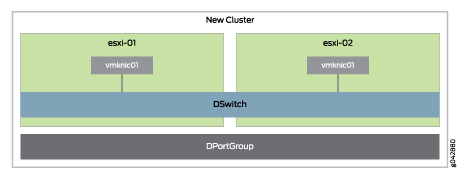
The VMware vSphere architecture is very simple. There are two
ESXi hosts in a cluster called “New Cluster.” Both of
the hosts have a distributed virtual switch called “DSwitch”
with a single port group “DPortGroup” as shown in Figure 1. The cluster is assigned to a data center
called “Datacenter.”
Figure 1: VMware vSphere Architecture
All NSX appliance VMs are placed into the distributed virtual
switch “DSwitch.” The local vSwitch0 is no longer used
for any type of traffic; all underlay traffic will ingress and egress
the distributed virtual switch.
VMware NSX
To enable SDN, there are many functions from management to packet
forwarding that need to be performed. Each functional component is
described next.
VMware NSX Manager
The VMware NSX Manager provides integration with VMware vCenter
Server which allows you to manage the VMware NSX environment through
VMware vCenter. All VMware NSX operations and configuration is done
through VMware vCenter, which communicates with VMware NSX Manager
through APIs to delegate tasks to the responsible owner.
VMware NSX Controller
All virtual network provisioning and MAC address learning is
handled through the VMware NSX Controller. You can think of the VMware
NSX Controller as the virtualized control plane of the SDN network.
VMware NSX Logical Distributed Router
The VMware NSX Logical Distributed Router (LDR) is responsible
for forwarding and routing all packets through the virtualized SDN
networks. It provides the following functionality:
Default gateway for all VMs
MAC address learning and flooding
Bridging and routing all packets between different virtual
networks
Peers with the VMware NSX Edge to progress egress traffic
outside of the virtual networks
Virtual tunnel end-point (VTEP) termination
Security policies and enforcement
Multi-tenancy
The NSX LDR is a great tool for coarse or fine-grained virtual
network segmentation. Multiple VMware NSX LDRs can be created to enable
multi-tenancy or a completely separate security zone for regularity
requirements such as Payment Card Industry Data Security Standard
(PCI DSS). Each VMware NSX LDR can create virtual switches, which
are just VXLAN Network Identifiers (VNIs). You can treat virtual switches
just like you used to use VLANs in a physical network. Virtual switches
are an easy way to create multi-tiered networks for applications.
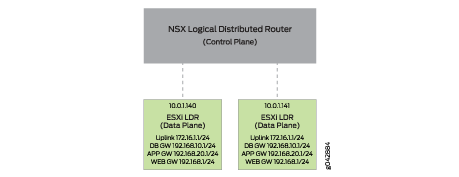
The VMware NSX LDR is split into two components: a control plane
and data plane. The control plane is responsible for the management
and provisioning of changes. The VMware NSX LDR is also installed
into each VMware ESXi host to handle the traffic forwarding and routing
as shown in Figure 2.
Figure 2: VMware NSX LDR Control Plane and Data
Plane
Each VMware host has a copy of the VMware NSX LDR running in
the hypervisor. All of the gateway interfaces and IP addresses are
distributed throughout the VMware cluster. This allows VMs to directly
access their default gateway at the local hypervisor. VMware NSX supports
three methods for MAC address learning:
Unicast—Each VMware host has a TCP connection to
the VMware NSX Controller for MAC address learning.
Multicast—The physical network – in this case,
the Virtual Chassis Fabric – uses multicast to replicate broadcast,
unknown unicast, and multicast traffic between all VMware hosts participating
in the same VNI.
Hybrid—Each VMware host has a TCP connection to
the VMware NSX Controller for MAC address learning, but uses the physical
network for local process of broadcast, unknown unicast, and multicast
traffic for performance.
If your environment is 100 percent virtualized, we recommend
that you use either unicast or hybrid mode. If you need to integrate
physical servers – such as mainframes – into the VMware
NSX virtual environment, you need to use multicast mode for MAC address
learning. Virtual Chassis Fabric allows you to configure multicast
with a single IGMP command and not have to worry about designing and
maintaining multicast protocols such as PIM.
All of the VMware NSX virtual switches are associated with a
VNI. Depending on the traffic profile, the LDR can either locally
forward or route the traffic. If the destination is on another host
or outside of the virtual NSX networks, the VMware NSX LDR can route
the traffic out to the VMware NSX Edge Gateway.
Each hypervisor has a virtual tunnel end-point (VTEP) that is
responsible for encapsulating VM traffic inside of a VXLAN header
and routing the packet to a destination VTEP for further processing.
Traffic can be routed to another VTEP on a different host or the VMware
NSX Edge Gateway to access the physical network.
In Table 1, you
can see all of the possible traffic patterns and how the VMware NSX
LDR handles them.
Table 1: Traffic Patterns
Handled by VMWare LDR
Source
Destination
Action
Local VM
Local VM, same network
Locally switch traffic
Local VM
Local VM, different network
Locally route traffic
Local VM
Remote VM, same network
Encapsulate traffic with VXLAN header and route to destination
VTEP
Local VM
Remote VM, different network
Encapsulate traffic with VXLAN header and route to destination
VTEP
Local VM
Internet
Encapsulate traffic with VXLAN header and route to VMware NSX
Edge Gateway
Local VM
Physical server outside of NSX virtual networks
Encapsulate traffic with VXLAN header and route to VMware NSX
Edge Gateway
VMware NSX Edge Gateway
The VMware NSX Edge Gateway is responsible for bridging the
virtual networks with the outside world. It acts as a virtual WAN
router that is able to peer with physical networking equipment so
that all of the internal virtual networks can access the Internet,
WAN, or any other physical resources in the network. The VMware NSX
Edge Gateway can also provide centralized security policy enforcement
between the physical network and the virtualized networks.
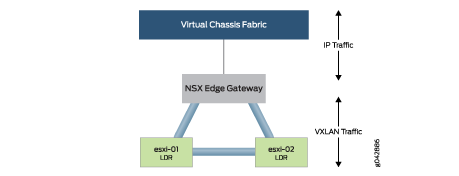
The VMware NSX Edge Gateway and LDR have a full mesh of VXLAN
tunnels as shown in Figure 3. This enables any
VMware ESXi host to communicate directly through the VXLAN tunnels
when they need to switch or route traffic. If traffic needs to enter
or exit the VMware NSX environment, the VMware NSX Edge Gateway removes
the VXLAN header and routes the traffic through its “Uplink”
interface and into the Virtual Chassis Fabric.
Figure 3: VXLAN Tunnels
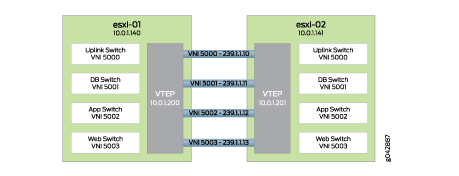
Each virtual switch on the VMware NSX LDR needs to be mapped
to a VNI and multicast group to enable the data plane and control
plane. It is as simple as choosing a different VNI and multicast group
per virtual switch as shown in Figure 4.
Figure 4: Overlay Tunnels and Multicast Groups
As VM traffic from esxi-01 needs to reach esxi-02, it simply
passes through the VXLAN tunnels. Depending on the type of traffic,
there are different actions that can take place as shown in Table 2.
Table 2: Traffic Types and Actions
Traffic Type
Action
Unicast
Route directly to the remote VTEP through the Virtual Chassis
Fabric
Unknown Unicast
Flood through multicast in the Virtual Chassis Fabric
Multicast
Flood through multicast in the Virtual Chassis Fabric
It is possible to associate multiple VNIs with the same multicast
group; however, in the MetaFabric Architecture 2.0 lab, we assigned
each VNI a separate multicast group for simplicity.
Overlay Architecture
The term “underlay” refers to the physical networking
equipment; in this case, it is the Virtual Chassis Fabric. The term
“overlay” refers to any virtual networks created by VMware
NSX. Virtual networks are created with a MAC-over-IP encapsulation
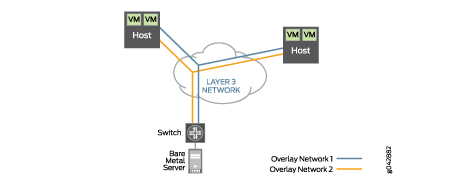
called VXLAN. This encapsulation allows two VMs on the same network
to talk to each other, even if the path between the VMs needs to be
routed as shown in Figure 5.
Figure 5: Overlay Architecture
All VM-to-VM traffic is encapsulated in VXLAN and transmitted
over a routed network to the destination host. Once the destination
host receives the VXLAN encapsulated traffic, it can remove the VXLAN
header and forward the original Ethernet packet to the destination
VM. The same traffic pattern occurs when a VM talks to a bare metal
server. The exception is that the top-of-rack switch handles the VXLAN
encapsulation on behalf of the physical server, as opposed to the
hypervisor.
The advantage of VXLAN encapsulation is that it allows you to
build a network that is based on Layer 3. The most common underlay
architecture for SDN is the IP fabric. All switches communicate with
each other through a typical routing protocol such as BGP. There is
no requirement for Layer 2 protocols such as Spanning Tree Protocol
(STP).
One of the drawbacks to building an IP fabric is that it requires
more network administration. Each switch needs to be managed separately.
Another drawback is that to allow the integration of bare metal servers
with VMware NSX for vSphere, multicast is required for the integration
of VXLAN and MAC address learning. This means that in addition to
building an IP fabric with BGP, you also need to design and manage
a multicast infrastructure with Protocol Independent Multicast (PIM)
protocols.
The advantage of Virtual Chassis Fabric is that you can build
an IP fabric and multicast infrastructure without having to worry
about BGP and PIM. Because the Virtual Chassis Fabric behaves like
a single, logical switch, you simply create integrated routing and
bridging (IRB) interfaces and all traffic is automatically routed
between all networks because each network appears as a directly connected
network. To enable multicast on a Virtual Chassis Fabric, you simply
enable Internet Group Management Protocol (IGMP) on any interfaces
requiring multicast. There is no need to design and configure PIM
or any other multicast protocols.
The concept of something happening “again” seems pretty simple. But
when dealing with industry-wide transformations, it’s an important
phenomenon. The journeys our customers take will not play out over the
course of a few months or even quarters. Change of the magnitude we are
seeing with multicloud and artificial intelligence will take time.
And that means that sustained execution in pursuit of a compelling
vision is important. It means doing things right. And then doing them
right…again.
Outside and Inside
For Juniper, having world-renowned analysts validate the direction
and execution of the company matters. These teams are seeing the
difference experienced by our customers and how the company is
innovating in the market with new choices to simplify operational models
across the data center and into public clouds.
We believe that analyst assessments provide only part of the story.
If you want to get a fuller picture, you need to combine it with a view
from our customers.
We are equally proud of being recognized as a April 2019 Gartner Peer Insights Customers’ Choice for Data Center Networking. Based on real feedback from 250 customers, Juniper has a 4.7 out of 5 average rating
for that market, as of 17 July 2019. To us, this means that it isn’t
just the observations of analysts, but the experiences of practitioners
that is garnering attention.
Growth in the Enterprise
In many ways, this recognition is merely a reflection of things that
we have known at Juniper for years. Our commitment to improving
networking for enterprises has resulted in more and more customers each
year. With Juniper, enterprises are delivering the outcomes that matter
most to their businesses. Our commitment to enterprise goes well beyond
repackaging products and moving into adjacent markets. It’s a big reason
we have grown our enterprise business to more than $1.5B in 2018,
representing roughly a third of our total business.
With Contrail Enterprise Multicloud, we have purpose-built an
orchestration platform ideal for operating in the era of multicloud.
Combined with our full line of enterprise data center switches and
routers—from top-of-rack to data center edge—and our security
solutions—from micro-segmentation to threat prevention to firewall—we
have the full end-to-end solution required to service everything an
enterprise may need. Our solutions simplify operations across
heterogeneous environments, focusing on infrastructure orchestration,
automation, programmability, ease of management, visibility and
analytics.
And with our recent acquisition of the wireless visionary company,
Mist Systems, we have brought Wi-Fi and artificial intelligence into the
solution mix. The future of enterprise IT will be AI-driven and we have
complete reach from data center to wireless access. Our solutions, such
as AI-driven enterprises and SD-WAN, can improve user-experience by
simplifying on-boarding processes, ensuring business-critical
application performance and automating security across the entire
network.
Getting from Here to There
Of course, helping enterprises navigate transitions is more than just
a technology discussion. Ultimately, it requires robust services,
education, training and support.
Our vision for multicloud and AI-driven operations recognizes that
the path each enterprise will take will be somewhat unique, based on
where they start, where they want to go and the real-life constraints
that stand in between. Juniper has spent time aligning our solutions and
services around migration models and designed explicitly to support
enterprises with a vendor-neutral view of how to plan and stage these
technology transitions.
Minimally, it means we can help enterprises even where Juniper
solutions might not be the right fit. Ideally, it means we will be a
partner on the path to multicloud and AI-driven operations. Either way,
enterprise customers win.
Customers First Ultimately, everything comes
down to customers. We know that Juniper is the best choice for anyone
who cares about being multicloud-ready in order to manage their
infrastructure resources as a single, cohesive entity without being
unnecessarily boxed in.
We encourage you to check out some of our customer success stories to see for yourself.
Every company has weighty imperatives to deliver tangible results
within their digital transformation initiatives. Potential consequences -
IT is being asked by the business for many new things and that means IT
has to rethink much of why it does something and how it does it.
The Junos Genius
continuous learning platform helps you learn Juniper technologies and
prepare for Juniper certification exams on your schedule. An app for iOS
and Android devices, along with laptops and desktops, Junos Genius
provides certification preparation resources, practice exams, and
e-learning courses developed by experts in Juniper technology. Courses
cover automation, routing, switching, security, and more.
Features and Benefits
65-item practice tests written by subject matter experts
Access the platform at your convenience, anytime and anywhere
Use any device—Junos Genius runs on your smartphone, tablet, or other mobile device, as well as your desktop or laptop
Receive ongoing training opportunities as new content is regularly added
The
65-item practice tests will help you prepare for multiple associate,
specialist, and professional-level JNCP certification exams
Juniper Learning Bytes will help you to become more proficient at managing your network of Juniper hardware and software
Take
on-demand training courses (purchased separately) and receive the same
level of knowledge, skills transfer, and hands-on lab experience as you
would in a traditional classroom environment
Unlimited access to all hardware overview and deployment courses
Resume courses where you left off with no interruptions
View content offline…simply download and view when it is convenient
This article provides
self-service instructions on how to transfer a license activation key
from a defective device to an RMA replacement device. The Juniper End
User License Agreement (EULA) states that RMA license keys may be
transferred where the following criteria are met:
The defective hardware product has an active support contract
JTAC has confirmed the hardware as defective via a Technical Service Request.
The replacement device is the same series/platform as the defective device.*
*The replacement device
may be one provided by Juniper Networks or a spare of the same model
provided from a partner's/customer's stock.
Symptoms:
My Juniper product has
faced a hardware failure, and I require to transfer the software license
keys from the defective device to a replacement device.
Solution: Important Notes:
Self-service RMA license transfer is available only where a Juniper RMA has been initiated by JTAC.
There is no option for self-service license transfer for the following conditions:
Customer/Partner Self-Sparing where no Juniper RMA # has been created
If your request falls into one of these conditions, contact Customer Care.
Follow the relevant self-service instructions below for your product, which depends on whether it is running Junos or non-Junos:
Junos OS Enabled Products (e.g. SRX Series, QFX Series, Ex Series)
Note:For
MX Series, no license transfer is required following RMA. You may
continue to use the same license unlocking key or trust-based Software
'Right to Use' on your replacement product. If you have misplaced your
MX Series unlocking key or Software 'Right to Use' document, then
contact Customer Care with your Purchase Order details.
Step 1: Gather the RMA number and device serial numbers:
RMA Number (e.g. R299218954)
Defective Device Serial Number
Replacement Device Serial Number*
Tip: This information is located via the Technical Service Request or the RMA's module in MyJuniper Service Request Manager (MYJ-SRM).
*The
Replacement Device Serial Number may be one provided by Juniper
Networks or a product of the same model provided from either a Juniper
Partner or spare stock. When deploying your own spare, please ensure
that you contact Customer Care so that support entitlement and product registration information may also be updated!
Step 2: Activate the replacement licenses using the RMA Tool:
Non-Junos OS Products (e.g. SSG Series, JSA Series, Junos Space)
Note: As specified in the important note above, for RMA
license key transfer on Juniper Advanced Threat Protection (JATP
Series), contact Customer Care.
Step 1: Gather the RMA number and Device Serial Numbers:
RMA Number (e.g. R299218954)
Defective Device Serial Number
Replacement Device Serial Number*
* The
Replacement Device Serial Number may be one provided by Juniper
Networks or a product of the same model provided from either a Juniper
Partner or spare stock. When deploying your own spare, please ensure
that you contact Customer Care so that support entitlement and product registration information may also be updated!
Step 2: Generate replacement licenses using the RMA Tool.