Wednesday, 23 March 2022

Reimagining Data Center Operations with Intent-Based Networking: The Latest Step in an Innovative Apstra Journey


New Apstra product enhancements make it easier than ever to experience the benefits of a Juniper experience-first data center

It’s been a little over a year since Juniper Networks took the bold step of acquiring Apstra, the creator of the only vendor-agnostic intent-based networking software for data center operations. In that time, much has happened both externally and internally at Juniper, all of which has enabled the company’s data center business to continue its growth. Many factors contributed to this tremendous success, including continued investment in the Juniper Apstra product, development of Apstra partners and significant Apstra customer momentum across both the enterprise and service provider segments.

Today, we’re excited to announce the latest series of Apstra product enhancements that will enable Juniper to continue its strong data center momentum into 2022 and beyond. Not only have we expanded all the benefits of our intent-based networking solution to more data center environments, but it’s even easier to deploy and operate with more robust security capabilities.

To the Edge and Beyond

No one could have predicted the surge in workload distribution that a pandemic would generate – including data volume and demand for faster, more reliable service. To support increasing business digitization and reduce latency, many organizations have turned to edge computing to bring data processing closer to the end user.

Now, in addition to using Apstra in centralized or hyperscale data centers, customers can use our powerful software in edge locations – or at any remote site that doesn’t require the full scale of a multistage switching network. With Apstra, networking teams can centrally design, deploy and operate a network consisting of an EVPN-VXLAN overlay with an IP fabric underlay in a configuration made up of only two leaf switches. Additionally, teams can scale and add access switches to the fabric whenever needed. Apstra will automatically register the new devices and apply the pre-validated configurations.

Zero Trust for a More Secure Data Center

Apstra’s single source of truth is a key foundation for Zero Trust security, enabling network operators and security experts to view the exact state of the network, its configuration and the intended outcome. Apstra’s enhanced policy assurance introduces new segmentation capabilities. By allowing organizations to apply all their security policies from a single point and to specify enforcement at the most granular level, Apstra ensures that the network is continuously compliant, consistent and reliable.

Apstra also provides:

  • Role-Based Access Control (RBAC) to limit who can see which data
  • Continuous validation against intent to identify configuration drift in real time
  • Policy assurance to confirm that security policies are being enforced as intended
  • Live audits to track the origin of changes

Improvements in RBAC, audit and security policy granularity have all been made to meet the requirements of customers using Apstra in multi-tenant environments.

Hassle-Free Deployments and Migrations

With IT requirements evolving at an unprecedented rate, constant data center deployments and migrations are inevitable. In addition, the number of data centers in use frequently changes, either increasing due to natural IT growth or acquisitions, or decreasing when older data centers are decommissioned or businesses divest themselves of certain IT requirements or applications. These deployments and migrations can be challenging, expensive and resource intensive. But they don’t have to be.

Juniper’s new Apstra Deployment and Migration services leverage Apstra’s intent-based networking architecture and in-house tools to help organizations significantly reduce the time, cost and risk associated with deployments. Our experts perform real-time preconditioned validations based on the exact blueprint, network models and operating systems. This enables customers to migrate to the latest architectures and automate everyday operations with minimal downtime and an unprecedented level of assurance, while also reducing the CapEx and OpEx associated with physical and virtual testing during deployment. Customers can also take advantage of best-practice design methodologies and in-house automation tools to accelerate deployments for increased business agility.

New Data Center Learning

Both experienced and new data center networkers will have the ability to advance their careers with Juniper’s revised curriculum that includes new and updated training and certifications.

  • Introduction to Juniper Data Center Networking: This foundational course provides introductory instruction on data center switching using Juniper products and covers the baseline knowledge necessary to understand a data center that’s built upon an IP fabric with an EVPN/VXLAN overlay. This is the recommended preparation for the new Juniper Networks Certified Associate, Data Center (JNCIA-DC) certification, which launches in May 2022.
  • Data Center Automation using Juniper Apstra: This expanded course provides the necessary knowledge required to manage data center networks with Apstra and now covers how to add a spine, leaf and generic system to a running blueprint (IP fabric), VMware integration and data center interconnect. It’s recommended as preparation for the new Juniper Networks Certified Specialist, Data Center (JNCIS-DC) certification, also launching in May 2022.
  • Data Center Fabric with EVPN and VXLAN: This recently updated course now includes coverage of enhanced loop protection, MAC-VRF, ERB, collapsed fabric configuration, super spine configuration, EVPN multicast-assisted replication, filter-based forwarding in the data center and seamless EVPN-VXL. This course is recommended training for the updated Juniper Networks Certified Professional, Data Center (JNCIP-DC)

A Year of Integration, Innovation and Achievements

Now that we’ve described the latest enhancements, let’s look back at how far Juniper has come with Apstra since the acquisition last year.

  • Apstra was integrated with more Juniper products. It takes time to fully integrate a newly acquired company, but Juniper hit the ground running this past year! We’ve added Apstra support for more Juniper switches and routers, as well as for all current versions of our Junos® operating system, including Junos Evolved in spine, super-spine and non-EVPN-VXLAN leafs.
  • Apstra adoption grew by leaps and bounds. Since the acquisition, Apstra logos have increased over 400 percent. Additionally, pre-acquisition customers renewed their Apstra licenses. For example, one Fortune 5 customer not only renewed, but also deployed Apstra to a second data center and introduced Apstra to a major managed services provider.
    • Juniper expanded Apstra’s multivendor support. Apstra is the only intent-based networking software that eliminates vendor lock-in, and Juniper proved that it was committed to keeping this unique feature. For example, in last year’s Apstra 4.0 release, we provided validated qualification for Cisco Systems, Arista Networks, Dell Technologies and added VMware NSX-T 3.0 and Enterprise SONiC integrations. Although we believe that customers benefit most by combining Apstra with our own QFX Series switches and other proprietary hardware and software, our primary goal is to give customers the tools they need to reduce operational complexity and assure reliability – regardless of which vendor environment they have.

    Tuesday, 1 February 2022

    2022-01 Security Bulletin: Junos OS and Junos OS Evolved: After receiving a specific number of crafted packets snmpd will segmentation fault (SIGSEGV) requiring a manual restart. (CVE-2022-22177)

     Product Affected:

    This issue affects Junos OS 12.3, 15.1, 18.3, 18.4, 19.1, 19.2, 19.3, 19.4, 20.1, 20.2, 20.3, 20.4, 21.1, 21.2. This issue affects any Junos OS Evolved releases prior to 21.2R3-EVO, 21.3.
    Problem:
    A release of illegal memory vulnerability in the snmpd daemon of Juniper Networks Junos OS, Junos OS Evolved allows an attacker to halt the snmpd daemon causing a sustained Denial of Service (DoS) to the service until it is manually restarted.

    This issue impacts any version of SNMP – v1,v2, v3

    This issue affects:
    Juniper Networks Junos OS
    • 12.3 versions prior to 12.3R12-S20;
    • 15.1 versions prior to 15.1R7-S11;
    • 18.3 versions prior to 18.3R3-S6;
    • 18.4 versions prior to 18.4R2-S9, 18.4R3-S10;
    • 19.1 versions prior to 19.1R2-S3, 19.1R3-S7;
    • 19.2 versions prior to 19.2R1-S8, 19.2R3-S4;
    • 19.3 versions prior to 19.3R3-S4;
    • 19.4 versions prior to 19.4R2-S5, 19.4R3-S6;
    • 20.1 versions prior to 20.1R3-S2;
    • 20.2 versions prior to 20.2R3-S3;
    • 20.3 versions prior to 20.3R3-S1;
    • 20.4 versions prior to 20.4R3;
    • 21.1 versions prior to 21.1R2-S2, 21.1R3;
    • 21.2 versions prior to 21.2R1-S2, 21.2R2.
    Juniper Networks Junos OS Evolved
    • 21.2 versions prior to 21.2R3-EVO;
    • 21.3 versions prior to 21.3R2-EVO.
    The following minimal configuration is needed:
    [snmp community 'community-name"] using a Read Write (RW) Community

    Read Only (RO) communities are not impacted by this issue.

    Juniper SIRT is not aware of any malicious exploitation of this vulnerability.

    This issue was discovered during external security research.

    This issue has been assigned CVE-2022-22177.

    Solution:

    The following software releases have been updated to resolve this specific issue:

    Junos OS: 12.3R12-S20, 15.1R7-S11, 18.3R3-S6, 18.4R2-S9, 18.4R3-S10, 19.1R2-S3, 19.1R3-S7, 19.2R1-S8, 19.2R3-S4, 19.3R3-S4, 19.4R2-S5, 19.4R3-S6, 20.1R3-S2, 20.2R3-S3, 20.3R3-S1, 20.4R3, 21.1R2-S2, 21.1R3, 21.2R1-S2, 21.2R2, 21.3R1, and all subsequent releases.

    Junos OS Evolved: 21.2R3-EVO, 21.3R2-EVO, 21.4R1-EVO, and all subsequent releases.

    This issue is being tracked as 1613874.

    Workaround:

    There are no workarounds for this issue.

    For V1, V2 you can reduce the risk of exploitation by configuring the client-list to limit access to network management system (NMS) machines.

    See the Network Management and Monitoring Guide for further instructions.

    example:

    [snmp client-list client-list-name "ip-addresses";]

    For V3 you can reduce the risk of exploitation by configuring SNMP security to trusted devices only.

    For any release of SNMP you can reduce the risk of exploitation by implementing source and destination IP filter rules as well as using Read Only communities where possible.

    Regardless of these risk reduction methods, an attacker able to spoof trusted IP addresses can send the attack to an exposed and reachable SNMP RW community.

    Implementation:
    Software releases or updates are available for download at https://support.juniper.net/support/downloads/.

    Sunday, 2 January 2022

    JUNOS Getting Started - Route-based vs Policy-based VPN

     Route-based vs Policy-based VPN

    With policy-based VPN tunnels, a tunnel is treated as an object that together with source, destination, application, and action, comprises a tunnel policy that permits VPN traffic. In a policy-based VPN configuration, a tunnel policy specifically references a VPN tunnel by name.

    With route-based VPNs, a policy does not specifically reference a VPN tunnel. Instead, the policy references a destination address. When the security device does a route lookup to find the interface through which it must send traffic to reach that address, it finds a route via a secure tunnel (ST) interface, which is bound to a specific VPN tunnel.

    Thus, with a policy-based VPN tunnel, you can consider a tunnel as an element in the construction of a policy. With a route-based VPN tunnel, you can consider a tunnel as a means for delivering traffic, and the policy as a method for either permitting or denying the delivery of that traffic.


    The following are reasons to implement route-based VPN:
    • Source or destination NAT (NAT-src or NAT-dst) needs to occur as traffic travels through the VPN.
    • There are overlapping subnets or IP addresses between the two LANs.
    • Hub-and-spoke VPN topology is used in the network.
    • Primary and backup VPN are required.
    • A dynamic routing protocol (for example, OSPF, RIP, or BGP) is running across the VPN.
    • Multiple subnets or networks at the remote site across the VPN need to be accessed.

    The following are reasons to implement policy-based VPN:

    • The remote VPN device is a non-Juniper device.
    • Only one subnet or one network at the remote site across the VPN needs to be accessed.

    Wednesday, 1 December 2021

    Junos following products are vulnerable to the issue described in CVE-2021-44228

    • Juniper Networks BTI proNX Service Manager Software
    • Juniper Networks JSA Series User Behavior Analytics prior to version 4.1.14 see https://www.ibm.com/support/pages/node/6526640 for further details.
    • Juniper Networks Junos Space Network Management Platform when OpenNMS has been enabled.
    • Juniper Networks NorthStar Controller / NorthStar Planner
    • Juniper Networks Paragon Pathfinder
      • 21 version 21.1, 21.2 and later versions.
    • Juniper Networks Paragon Planner
      • 21 version 21.1, 21.2 and later versions.

    Monday, 1 November 2021

    Junos : request chassis cluster failover redundancy-group

     Syntax

    content_copy zoom_out_map
    request chassis cluster failover node node-number redundancy-group redundancy-group-number
    

    Description

    For chassis cluster configurations, initiate manual failover in a redundancy group from one node to the other, which becomes the primary node, and automatically reset the priority of the group to 255. The failover stays in effect until the new primary node becomes unavailable, the threshold of the redundancy group reaches 0, or you use the request chassis cluster failover reset command.

    After a manual failover, you must use the request chassis cluster failover reset command before initiating another failover.

    Options

    • node node-number—Number of the chassis cluster node to which the redundancy group fails over.

    • Range: 0 or 1

    • redundancy-group group-number—Number of the redundancy group on which to initiate manual failover. Redundancy group 0 is a special group consisting of the two Routing Engines in the chassis cluster.

      Range: 0 through 255

    Required Privilege Level

    maintenance

    Sunday, 3 October 2021

    Juniper : SD-WAN


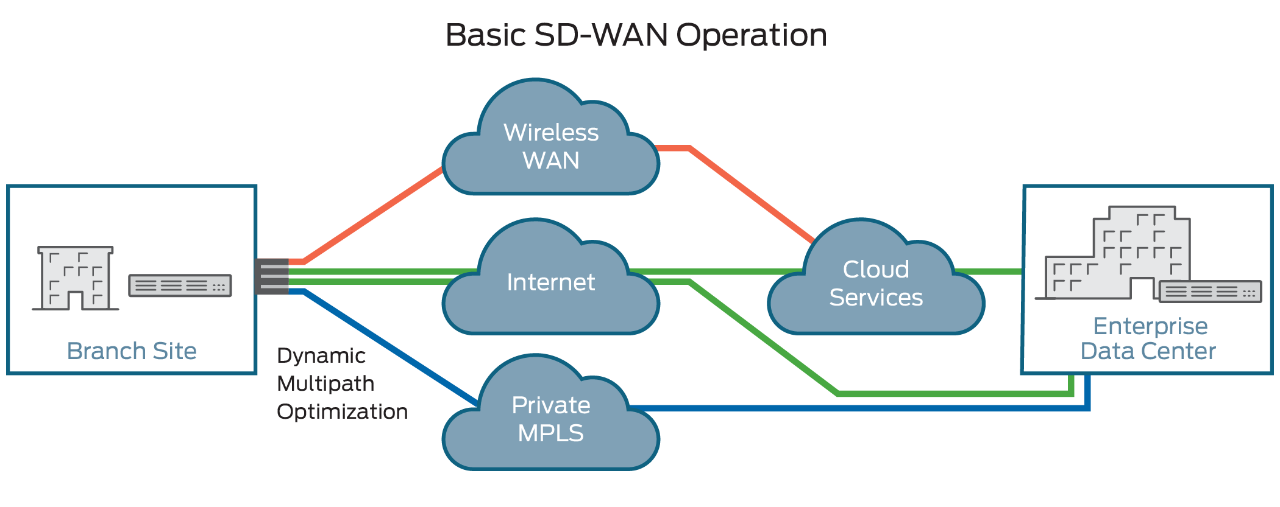
    Software-defined wide-area networking (SD-WAN) is an automated, programmatic approach to managing enterprise network connectivity and circuit costs. It extends software-defined networking (SDN) into an application that businesses can use to quickly create a smart hybrid WAN.

    Consisting of business-grade IP VPN, broadband Internet, and wireless services, SD-WAN enables you to cost-efficiently manage applications, particularly in the cloud. Traffic is automatically and dynamically forwarded across the most appropriate and efficient WAN path based on network conditions, application traffic security and quality-of-service (QoS) requirements, and circuit cost. You can set the routing policies.

    Basic SD-WAN Operation

    SD-WAN Benefits

    Businesses are rapidly adopting SD-WAN technology because of its comprehensive financial and operational benefits.

    • Lowers WAN OpEx, CapEx, and overall total cost of ownership.
    • Provides greater business agility and responsiveness to keep pace with IT innovations.
    • Supports multiple, secure, high-performance connections, eliminating backhaul penalties imposed by MPLS networks.
    • Improves performance by enabling load sharing across connections and adjusting traffic flows based on network conditions.
    • Supports the automated provisioning of, and changes to, premium network services such as VPNs, firewalls, security, WAN optimization, and application delivery control.
    • Supports zero touch provisioning (ZTP).
    • Improves network security by encrypting WAN traffic and segmenting the network to minimize damage if breaches occur.


    Problems Addressed by SD-WAN

    Managing the WAN traditionally has been one of the most expensive and rigid aspects of running an enterprise network. SD-WAN eases this burden by proactively responding to real-time network conditions. It uses programmable network devices that you can modify remotely and through dynamic best-path routing, both of which improve cost, agility, and performance.


    SD-WAN Uses and Functions

    SD-WAN software running on CPE (customer premises equipment) monitors the conditions of all public and private-line services and determines how to route each type of application traffic. For instance, the default might be to send voice-over-IP (VoIP) traffic over an MPLS VPN service. However, if the MPLS connection becomes congested, the SD-WAN might switch that traffic over to a broadband Internet or 4G LTE wireless circuit. In this way, the SD-WAN enables automatic load balancing and network congestion management for best performance and least-cost effective routing.

    Sunday, 5 September 2021

    Junos Software Versions - Suggested Releases to Consider and Evaluate

    Summary:

    Juniper provides this document as a means to help customers and Juniper manufacturing select a Junos software version that aligns with their deployment needs. The releases listed below have performed well for the general population, but note that due to the uniqueness of our customer network deployments to include areas such as design, traffic patterns/flows, and specific usage of features and functionality, Juniper recommends that all customers A) read the associated Release Notes to understand how features, functionality, fixes, and any known outstanding issues may apply to your specific network and applications, and B) test and certify the suggested code version(s) to ensure they will perform as expected in your network.

    This article applies to the following devices:

    • EX Series
    • M, T, and MX Series
    • ACX Series
    • NFX Series
    • QFX Series
    • SRX Series

    For other Junos devices, refer to the Release Notes and the Alerts column on the Download Software pages.

    Notes:

    1. The software versions included in this article are selected by utilizing input from Juniper Engineering, customers, and analysis of field usage data.
    2. To be automatically notified of updates to this document, use the Subscribe link. If you do not see the Subscribe link, log in with your user account.
    3. ​Juniper Networks offers optional fee-based services to further aide customers in selecting and testing software releases. If interested in more information, please contact your Juniper Sales Representative to discuss offering details and pricing.
    Symptoms:

    For use by customers and Juniper manufacturing planning an upgrade or initial installation.

    Exceptions for evaluating these suggested software versions include:

    • A Juniper Engineer has recommended that a customer use a specific version of Junos software that is different from what is listed here in this article.

    • You require specific features (Feature Explorer) that are available only in another version of Junos software. In that case, be sure to download the latest maintenance release.

    • Your currently installed version of Junos is meeting your requirements as is.

    • If you use NSM, refer to the NSM & Junos Compatibility Matrix to make sure the suggested Junos software version can be managed by NSM.

    To see the list​ of End of Engineering (EOE) and EOS (End of Support) dates for specific Junos versions, please go to the Junos Dates & Milestones page: https://support.juniper.net/support/eol/software/junos/

    To see features supported per specific Junos versions, please go the Juniper Pathfinder page and navigate to "Feature Explorer": https://apps.juniper.net/home/

    Solution:

    To download Junos Software, go to the Software Download site and find your product.

    Suggested Junos Software Versions for your consideration and evaluation are listed in the tables below. 

    NOTE: To locate a Junos release containing an 'S' (i.e. Junos 17.3R3-S3), on the Software Download product page change the OS drop-down from Junos to Junos SR
     

    Select to jump to a platform series:


    EX Series Ethernet Switches

    Platform Junos Software by Platform Last
    Updated
    EX2200 (See Note 3) Junos 12.3R12-S15 09 Mar 2020
    EX2200-C ( See Note 3) Junos 12.3R12-S15 09 Mar 2020
    EX2300 Junos 18.2R3-Latest Service Release / 20.2R3 or Latest Service Release 21 Apr 2021
    EX2300-C Junos 18.2R3-Latest Service Release / 20.2R3 or Latest Service Release 21 Apr 2021
    EX3200 Junos 12.3R12-S15 / 14.1X53-D40 09 Mar 2020
    EX3300 ( See Note 4) Junos 12.3R12-S15 09 Mar 2020
    EX3400 Junos 18.2R3-Latest Service Release / 20.2R3 or Latest Service Release 21 Apr 2021
    EX4200  Junos 12.3R12-S15 / 15.1R7-S6 09 Mar 2020
    EX4300 Junos 18.4R2-Latest Service Release / 20.2R3 or Latest Service Release 21 Apr 2021
    EX4300-MP Junos 18.4R2-Latest Service Release / 20.2R3 or Latest Service Release 21 Apr 2021
    EX4400 Junos 21.1R2  23 Aug 2021
    EX4500  Junos 12.3R12-S15 / 15.1R7-S6 09 Mar 2020
    EX4550  Junos 12.3R12-S15 / 15.1R7-S6 09 Mar 2020
    EX4600 Junos 18.4R2-Latest Service Release / 20.2R3 or Latest Service Release 21 Apr 2021
    EX4650 Junos 18.4R2-Latest Service Release / 20.2R3 or Latest Service Release 21 Apr 2021
    EX6200 Junos 12.3R12-S15 / 15.1R7-S6 09 Mar 2020
    EX8200 (See Note 2) Junos 12.3R12-S15 / 15.1R7-S6 09 Mar 2020
    EX8200-VC (XRE200) (See Note 2 ) Junos 12.3R12-S15 / 15.1R7-S6 09 Mar 2020
    EX9200  Junos 18.4R2-Latest Service Release / 20.2R3 or Latest Service Release 21 Apr 2021
    EX9251 Junos 18.4R2-Latest Service Release / 20.2R3 or Latest Service Release 21 Apr 2021
    EX9253 Junos 18.4R2-Latest Service Release / 20.2R3 or Latest Service Release 21 Apr 2021
    Junos Fusion Enterprise (JFE) Junos 18.4R2-Latest Service Release / 20.2R3 or Latest Service Release 21 Apr 2021
     

    Notes:

    1. It is highly recommended to refer to the Release Notes, Technical Documentation, and KB articles for any outstanding and resolved issues before making the upgrade decision. Contact JTAC if there are any queries.
    2. Please refer to TSB16758 for minimum software requirements for newer revision EX8200 linecards.
    3. Please refer TSB17138 for more details.
    4. Please refer TSB17329 .
    (back to the top)


    ACX Series Service Routers

    Platform Junos Software by Platform Release Type Last
    Updated
    ACX500 Junos 19.4R3-S3
    Junos 20.2R3
    Standard 02 Jun 2021
    ACX710 Junos 20.2R2-S2 Standard 02 Jun 2021
    ACX1000 Junos 19.4R3-S3
    Junos 20.2R3
    Standard 02 Jun 2021
    ACX1100 Junos 19.4R3-S3
    Junos 20.2R3
    Standard 02 Jun 2021
    ACX2000 Junos 19.4R3-S3
    Junos 20.2R3
    Standard 02 Jun 2021
    ACX2100 Junos 19.4R3-S3
    Junos 20.2R3
    Standard 02 Jun 2021
    ACX2200 Junos 19.4R3-S3
    Junos 20.2R3
    Standard 02 Jun 2021
    ACX4000 Junos 19.4R3-S3
    Junos 20.2R3
    Standard 02 Jun 2021
    ACX5448 Junos 20.2R3 Standard 02 Jun 2021
    ACX5048 / ACX5096 Junos 20.2R3 Standard 02 Jun 2021

    (back to the top)

    M, T, PTX, and MX Series Routers

    Platform Junos Software by Platform Last
    Updated
    M Series Junos 15.1R7 29 Jan 2020
    T Series (all including TX, TXP, TXP-3D) Junos 15.1R7
    Junos 16.1R7
    21 Apr 2020
    PTX Series (See KB33938 for detail)
        (Except ones listing below)
    Junos 17.3R3-S10
    Junos 17.4R2-S10
    Junos 18.2R3-S8
    Junos 19.2R1-S4
    Junos 19.3R3-S3
    10 Aug 2021
    PTX10001-36MR Junos Evolved 20.4R2-EVO 11 May 2021
    PTX10003 Junos Evolved 20.4R2-EVO 11 May 2021
    PTX10004 Junos Evolved 20.4R2-EVO 11 May 2021
    PTX10008/16 with FAN2/AC2/DC2 Components
        (Do not use if deploy - JNP10008-SF3)
    Junos 19.2R1-S4 21 Apr 2020
    PTX10008 with PTX10K-LC1201-36CD and JNP100008-SF3
    JNP10K-RE1-E
    Junos Evolved 20.4R2-EVO 11 May 2021
    PTX10008 with PTX10K-LC1202 and JNP100008-SF3
    JNP10K-RE1-E
    Junos Evolved 20.4R2-EVO 11 May 2021
    MX Series Junos 17.3R3-S10
    Junos 18.4R2-S5
    Junos 19.3R3-S2
    Junos 19.4R3-S3
    01 Jun 2021
    MX Series with MX-SPC3 Junos 19.4R3-S3 02 Jun 2021
    MX 2008/2010/2020 Junos 17.3R3-S10
    Junos 17.4R3-S3  (MIC-MACSEC)
    Junos 20.1R2-S1 (MPC11)
    11 Nov 2020
    MX240/480/960 with SCBE3 Junos 19.3R3-S2
    Junos 19.4R3-S3
    Junos 20.2R3-S1
    01 Jun 2021
    MX240/480/960 with MPC10E Junos 19.4R3-S3
    Junos 20.2R3-S1
    01 Jun 2021
    MX5, MX10, MX40, MX80, MX104 Series Junos 17.3R3-S10
    Junos 19.4R3-S3

    01 Jun 2021
    MX150, MX204, MX10003 Series Junos 19.4R3-S3
    Junos 20.2R3-S1
    Junos 20.4R2
    01 Jun 2021
    MX10008 Series Junos 19.3R3-S2
    Junos 19.4R3-S3
    01 Jun 2021
    MX10016 Series Junos 19.3R3-S2
    Junos 19.4R3-S3
    12 Nov 2021
    MX Subscriber Management(*1) Junos 19.4R3-S3 02 Jun 2021
    MX Services on MS-DPC Junos 17.3R3-S3 23 July  2019
    MX Services on MS-MPC/MIC(*3) Junos 19.4R3-S3 02 Jun 2021
    vMX / vBNG(*2) Junos 19.4R3-S3 02 Jun 2021
     

    Notes:

    1. This includes subscriber management deployments that incorporate services such as CGNAT, etc.
    2. See KB33938 for detail information and directly downloadable links to software for M/MX/PTX/T-Series JUNOS Software
    3. Recently released hardware may require a software version newer than listed above. Please use the latest Service Release for the required JUNOS software version
    4. Due to feature parity recommended from Product Line Management
    5. MPC11 is not supported in Junos 19.4
      (back to the top)


    NFX Series Network Services Platform

    Platform Junos Release Software Architecture Release Type Last
    Updated
    NFX150 Junos 20.2R2 nfx-3 Service 08 Jun 2021
    NFX250 Junos 18.4R3 nfx-2 Standard 11 May 2020
    NFX250-NG Junos 20.2R2 nfx-3 Standard 08 Jun 2021
    NFX350 Junos 20.2R2 nfx-3 Standard 08 Jun 2021

    (back to the top)

    QFX Series

    Platform Junos Software by Platform Last
    Updated
    QFX3500 / QFX3600          Junos 14.1X53-D54 26 May 2020
    QFX5100  Junos 18.4R2-S5 and subsequent service releases / 20.2R3 01 Jun 2021
    QFX5200 Junos 18.4R2-S5 and subsequent service releases / 20.2R3 01 Jun 2021
    QFX5200-EVO Junos Evolved 18.3R1-EVO 19 Aug 2021
    QFX5110 Junos 18.4R2-S5 and subsequent service releases / 20.2R3 01 Jun 2021
    QFX5120-32C Junos 19.1R3-S2 and subsequent service releases / 20.2R3 01 Jun 2021
    QFX5120-48Y Junos 18.4R2-S5 and subsequent service releases / 20.2R3 01 Jun 2021
    QFX5120-48T Junos 20.2R3 01 Jun 2021
    QFX5210 Junos 18.4R2-S5 and subsequent service releases / 20.2R3 01 Jun 2021
    QFX10002 / QFX10008 / QFX10016 Junos 18.4R2-S5 and subsequent service releases / 20.2R3 01 Jun 2021
    QFX10002-60C Junos 19.1R3-S2 and subsequent service releases / 20.2R3 01 Jun 2021
    EVPN-VXLAN Fabric CRB (Centrally Routed Bridging) Junos 18.4R2-S5 and subsequent service releases / 20.2R3 01 Jun 2021
    EVPN-VXLAN Fabric ERB ( Edge Routed Bridging)  Junos 18.4R2-S5 and subsequent service releases / 20.2R3 01 Jun 2021
    IP-Fabric ( QFX10K and QFX5K) Junos 18.4R2-S5 and subsequent service releases / 20.2R3   01 Jun 2021
    VCF-QFX5110 Junos 17.4R2 latest service release/ 20.2R3     01 Jun 2021
    VCF-QFX5100 Junos 17.4R2 latest service release / 20.2R3     01 Jun 2021
    VC-QFX5100 Junos 17.4R2 latest service release / 20.2R3  01 Jun 2021
    VC-QFX5110 Junos 17.4R2 latest service release / 20.2R3  01 Jun 2021
    VC-QFX5120 Junos 20.2R3 01 Jun 2021
    VC-QFX5120-32C Junos 20.4R2 and subsequent service releases 01 Jun 2021
    VC-QFX5200 Junos 17.4R2 latest service release / 20.2R3 01 Jun  2021
    MC-LAG (QFX5K) Junos 20.2R3 01 Jun 2021
    MC-LAG (QFX10K) Junos 20.2R3 01 Jun 2021
    Junos Fusion Datacenter (JFD) - MC-LAG Junos 17.3R3-S3 12 Feb 2019
    Junos Fusion Datacenter(JFD) - EVPN Junos 18.1R2-S2 28 Feb 2019
    Qfabric (See Note 1) Junos 14.1X53-D130 30 Jul 2019


    Note:

    1. Qfabric NSSU upgrade from Junos 12.2X50 to later releases is NOT recommended. Please see TSB16842 for more details.

    (back to the top)


    SRX Series Services Gateways

    Platform Junos Software by Platform Release Type Last
    Updated
    vSRX Junos 19.4R3-S1 Service 06 Jan 2021
    vSRX 3.0 Junos 19.4R3-S1 Service 06 Jan 2021
    SRX100H2 / SRX110H2 / SRX210HE2 / SRX220H2 / SRX240H2 Junos 12.3X48-D105 Standard 16 Oct 2020
    SRX300 / SRX320 / SRX340 / SRX345 Junos 19.4R3-S1 Service 06 Jan 2021
    SRX380 Junos 20.2R3 Standard 26 Apr 2021
    SRX550 Junos 12.3X48-D105 Standard 16 Oct 2020
    SRX550HM Junos 19.4R3-S1 Service 06 Jan 2021
    SRX650 Junos 12.3X48-D105 Standard 16 Oct 2020
    SRX1400 Junos 12.3X48-D105 Standard 16 Oct 2020
    SRX1500 Junos 20.2R3 Standard 26 Apr 2021
    SRX3400 / SRX3600 Junos 12.3X48-D105 Standard 16 Oct 2020
    SRX4100 / SRX4200 Junos 19.4R3-S1 Service 06 Jan 2021
    SRX4600 Junos 19.4R3-S1 Service 06 Jan 2021
    SRX5400 / SRX5600 / SRX5800
    with SRX5K-RE3-128G (*1)
    Junos 19.4R3 Standard 04 May 2021
    SRX5400 / SRX5600 / SRX5800
    with RE-1800X4 (*1)
    Junos 19.4R3 Standard 04 May 2021
    SRX5400 / SRX5600 / SRX5800
    with SRX5K-RE-13-20 (*1)
    Junos 12.3X48-D105(*2) Standard 16 Oct 2020
     

    Notes:

    1. KB30446 - SRX Junos SRX5K Hardware / Software compatibility matrix.

    2. TSB17655 - On SRX5000 series with SRX5k RE-13-20 a software upgrade to Junos release 12.3X48-D80, D85 or D90 may fail the pre-check due to insufficient space available on the compact flash.

    3. Junos OS upgrade from 18.4R3 or 18.4R3 based Service Releases directly to 19.4R3 or 19.4R3 based Service Releases is supported for all SRX platforms.

    4. Notes for upgrading from Junos 15.1X49 releases to 19.4R3 or 19.4R3 based Service Releases:

      • Junos OS upgrade from 15.1X49 directly to 19.4R3 or 19.4R3 based Service Releases is supported for all SRX platforms (ISSU is not supported). Note: PR1572963 - Junos OS upgrade from 15.1X49 directly to 19.4R3-S2 fails on SRX5400 / SRX5600 / SRX5800.

      • In case you would need to rollback or downgrade from 19.4 to the 15.1X49 release on SRX1500, SRX4100/4200, SRX5k or vSRX, all files on the device may be lost. Hence it is important to backup the relevant files (configuration, license-keys etc) before the upgrade and have console access during the upgrade and during a potential rollback if required.

      • For vSRX the following limitations apply when upgrading from 15.1X49 directly to 19.4R3 or 19.4R3 based Service Releases:

        • The file system mounted on /var usage must be below 14% of capacity.
          Check this with
          root@vsrx> show system storage | match " /var$"
          /dev/vtbd1s1f 2.7G 82M 2.4G 3% /var

          Note: The CLI command ‘request system storage cleanup’ may help reach that percentage if needed

        • The Junos upgrade image must be placed in the directory /var/host-mnt/var/tmp/
          request system software add /var/host-mnt/var/tmp/

        • It is recommended to deploy a new vSRX VM instead of performing a Junos upgrade. That also gives the option to move from vSRX to the newer and more recommended vSRX 3.0.
           

      • ISSU is not supported when upgrading from Junos 15.1X49 to any higher versions.

      • KB34945 - When Junos Space Security Director is used for managing the SRX configuration and the AppFW, IDP or UTM features are used, then when upgrading to Junos 18.2R1 or higher, the SRX configuration needs to be migrated to the new Unified Policies style and Security Director version 19.3 or higher is required.

      • Starting with Junos OS Release 17.3, when you upgrade from Junos OS Release 15.1X49 to Junos OS Release 17.3 or higher, or downgrade from Junos OS Release 17.3 or higher to Junos OS Release 15.1X49, you must update the IPS signature package by downloading and installing the IPS signature package update.

    loading...