Saturday, 2 January 2021

What is a Fabric, Anyway?

If someone could arrange a competition between different physical network topologies, the spine-and-leaf fabric would reign as the undisputed champion in many ways. What is different about the spine-and-leaf that would declare this type of network topology “the champion?”

The spine-and-leaf is a special kind of network, called a fabric, with some interesting mathematical properties. One of the most interesting, from a design perspective, is that fabrics are regular, which means they are built out of what some may call “micro-modules”— clearly repeatable sections of the network topology. These repeating sections of the network topology are not directly related to traditional modules built around creating failure and security domains, but they still enable some interesting properties related to the design and management of a data center network.

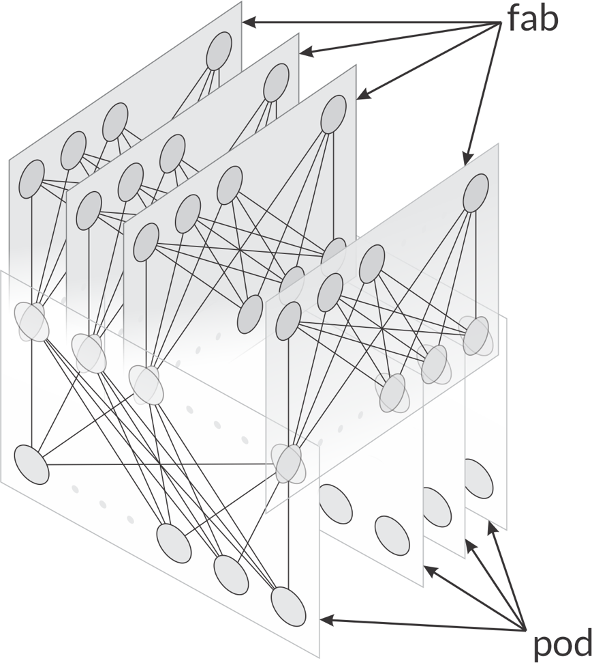
Many five-stage fabric designs easily lend themselves to breaking the network up into fabs and pods, as shown in the illustration below. Any fab or pod can be replaced without impacting the overall fabric design much like an access layer module in a traditional three-layer hierarchical design.

A diagram that shows network fabs and pods in an architecture


The repeatability of these modules enables automation, just as any other modular network design does. New pods can be added to the fabric and measured while the load is slowly moved onto them to ensure they are operating correctly—all while the fabric is in production. This is called a canary and allows the operator to add or replace network elements at the pod or fab level while controlling risk.

Because pods and fabs can be replaced in this way, they can also be managed in generations, or a repeatable set of hardware, software, configurations and tools. By controlling the number of generations within the fabric, the operator can directly control one of the many elements of network complexity—the variability of configurations.

The spine-and-leaf is also a universal topology, which means it can optimally support just about every kind of traffic flow on a single physical topology. This enables several types of applications, including applications with extremely hard performance requirements, to run efficiently across a spine-and-leaf fabric.

While the spine-and-leaf is a fascinating kind of network topology, many network engineers are still unaware of (or not fully aware of) the many interesting aspects of this network design, its origin and its properties.


Saturday, 5 December 2020

Wired and Wireless Access, Driven by Mist AI

The network for the AI-Driven Enterprise.

Experience is the new uptime. The network for the next decade is revolutionizing enterprise networks with AI-driven automation, actionable insights, and the agility plus elasticity of a microservices cloud.


It applies artificial intelligence and data science tools to deliver optimized experiences and simplified network operations. Traditional wired and wireless LAN solutions are built on antiquated architectures that lack the scale, reliability and agility needed to address today’s diverse enterprise needs.

Juniper Networks, driven by Mist AI, offers wired and wireless access solutions including the EX Series Switches, Juniper access points, and Juniper Mist cloud services


Leveraging this solution, IT teams can streamline operations and simplify user and device troubleshooting, while delivering innovative and strategic projects with IoT and location services.


Thursday, 5 November 2020

Artificial Intelligence and Machine Learning

Transform IT with AI-driven operations and support

Artificial intelligence technologies are adopted in multiple business areas and network operations is no exception. The need to resolve complex network issues, prevent threats and grow business all lend themselves to AI. At Juniper, our solutions, driven by Mist AI, are proven to simplify network complexity and empower your network to more autonomously support your business over the next decade.

The Conversational AI engine: Marvis leverages a rich data science toolbox to implement algorithms such as mutual information, decision trees, reinforcement learning, and natural language processing. It understands user intent and proactively resolves network and client problems so IT teams spend less time looking for root cause. Juniper employs Marvis to tackle our customers’ trouble tickets in our own AI-driven support model. Each support ticket that comes is processed with Marvis, allowing our data science and support teams to work together to improve and retrain Marvis. This model improves the efficacy of Marvis creating a feedback loop between our customers, support, and data science teams. Due to this support model customers using Marvis frequently see a drop of 40% to 90% in user generated trouble tickets.

Assurance for Wired, Wireless and WAN: An essential part of our cloud services portfolio that leverages multiple Machine Learning algorithms to optimize network performance, simplify operations, streamline troubleshooting and provide visibility into user experience.

HealthBot: A highly automated network analytics solution that collects, aggregates, and analyzes large volumes of real-time telemetry data to provide a multidimensional view of device, network and service health. It offers various machine learning algorithms, which provide anomaly and outlier detection, as well as predictive behavior analysis for future device or network-level behavior.

Juniper Advanced Threat Prevention (ATP): Finds and blocks both known and unknown cyber threats by leveraging static and dynamic malware analysis coupled with machine learning algorithms. The ATP Cloud malware detection pipeline takes advantage of machine learning to correlate malware with the results of antivirus scans, static analyses, and dynamic analyses.

Location Services: Juniper’s AI-Driven Location-Based Service integrates enterprise-grade virtual Bluetooth LE (vBLE) and IoT with Wi-Fi to deliver the industry’s most accurate and scalable services, including User Engagement, Asset Visibility, and Contact Tracing. It leverages the Mist AI and cloud-based machine learning to bring new values to wireless networks through personalized location services while providing unparalleled user experiences.

Saturday, 17 October 2020

Junos Software Versions - Suggested Releases to Consider and Evaluate

 Summary:

Juniper provides this document as a means to help customers and Juniper manufacturing select a Junos software version that aligns with their deployment needs. The releases listed below have performed well for the general population, but note that due to the uniqueness of our customer network deployments to include areas such as design, traffic patterns/flows, and specific usage of features and functionality, Juniper recommends that all customers A) read the associated Release Notes to understand how features, functionality, fixes, and any known outstanding issues may apply to your specific network and applications, and B) test and certify the suggested code version(s) to ensure they will perform as expected in your network.

This article applies to the following devices:

  • EX Series
  • M, T, and MX Series
  • ACX Series
  • NFX Series
  • QFX Series
  • SRX Series

For other Junos devices, refer to the Release Notes and the Alerts column on the Download Software pages.

Notes:

  1. The software versions included in this article are selected by utilizing input from Juniper Engineering, customers, and analysis of field usage data.
  2. To be automatically notified of updates to this document, use the Subscribe link. If you do not see the Subscribe link, log in with your user account.
  3. ​Juniper Networks offers optional fee-based services to further aide customers in selecting and testing software releases. If interested in more information, please contact your Juniper Sales Representative to discuss offering details and pricing.
Symptoms:

For use by customers and Juniper manufacturing planning an upgrade or initial installation.

Exceptions for evaluating these suggested software versions include:

  • A Juniper Engineer has recommended that a customer use a specific version of Junos software that is different from what is listed here in this article.

  • You require specific features (Feature Explorer) that are available only in another version of Junos software. In that case, be sure to download the latest maintenance release.

  • Your currently installed version of Junos is meeting your requirements as is.

  • If you use NSM, refer to the NSM & Junos Compatibility Matrix to make sure the suggested Junos software version can be managed by NSM.

To see the list​ of End of Engineering (EOE) and EOS (End of Support) dates for specific Junos versions, please go to the Junos Dates & Milestones page: https://support.juniper.net/support/eol/software/junos/

To see features supported per specific Junos versions, please go the Juniper Pathfinder page and navigate to "Feature Explorer": https://apps.juniper.net/home/

Solution:

To download Junos Software, go to the Software Download site and find your product.

Suggested Junos Software Versions for your consideration and evaluation are listed in the tables below. 

NOTE: To locate a Junos release containing an 'S' (i.e. Junos 17.3R3-S3), on the Software Download product page change the OS drop-down from Junos to Junos SR
 

Select to jump to a platform series:


EX Series Ethernet Switches

Platform Junos Software by Platform Last
Updated
EX2200 (See Note 3) Junos 12.3R12-S15 9 Mar 2020
EX2200-C ( See Note 3) Junos 12.3R12-S15 9 Mar 2020
EX2300 Junos 18.2R3-S5 16 Sep 2020
EX2300-C Junos 18.2R3-S5 16 Sep 2020
EX3200 Junos 12.3R12-S15 / 14.1X53-D40 9 Mar 2020
EX3300 ( See Note 4) Junos 12.3R12-S15 9 Mar 2020
EX3400 Junos 18.2R3-S5 16 Sep 2020
EX4200  Junos 12.3R12-S15 / 15.1R7-S6 9 Mar 2020
EX4300 Junos 18.4R2-S5 / 19.1R3-S2 16 Sep 2020
EX4300-MP Junos 18.4R2-S5 / 19.1R3-S2 16 Sep 2020
EX4500  Junos 12.3R12-S15 / 15.1R7-S6 9 Mar 2020
EX4550  Junos 12.3R12-S15 / 15.1R7-S6 9 Mar 2020
EX4600 Junos 18.4R2-S5 / 19.1R3-S2 16 Sep 2020
EX4650 Junos 18.4R2-S5 / 19.1R3-S2 16 Sep 2020
EX6200 Junos 12.3R12-S15 / 15.1R7-S6 9 Mar 2020
EX8200 (See Note 2) Junos 12.3R12-S15 / 15.1R7-S6 9 Mar 2020
EX8200-VC (XRE200) (See Note 2 ) Junos 12.3R12-S15 / 15.1R7-S6 9 Mar 2020
EX9200  Junos 18.4R2-S5 / 19.1R3-S2 16 Sep 2020
EX9251 Junos 18.4R2-S5 / 19.1R3-S2 16 Sep 2020
EX9253 Junos 18.4R2-S5 / 19.1R3-S2 16 Sep 2020
Junos Fusion Enterprise (JFE) Junos 18.4R2-S5 / 19.1R3-S2 16 Sep 2020
 

Notes:

  1. It is highly recommended to refer to the Release Notes, Technical Documentation, and KB articles for any outstanding and resolved issues before making the upgrade decision. Contact JTAC if there are any queries.
  2. Please refer to TSB16758 for minimum software requirements for newer revision EX8200 linecards.
  3. Please refer TSB17138 for more details.
  4. Please refer TSB17329 .
(back to the top)


ACX Series Service Routers

Platform Junos Software by Platform Release Type Last
Updated
ACX500 Junos 17.4R2-Sx (where x=latest on download page) Standard 9 April 2019
ACX1000 Junos 17.4R2-Sx (where x=latest on download page) Standard 9 April 2019
ACX1100 Junos 17.4R2-Sx (where x=latest on download page) Standard 9 April 2019
ACX2000 Junos 17.4R2-Sx (where x=latest on download page) Standard 9 April 2019
ACX2100 Junos 17.4R2-Sx (where x=latest on download page) Standard 9 April 2019
ACX2200 Junos 17.4R2-Sx (where x=latest on download page) Standard 9 April 2019
ACX4000 Junos 17.4R2-Sx (where x=latest on download page) Standard 9 April 2019
ACX5448 Junos 19.4R3 Standard 15 Oct 2020
ACX5048 / ACX5096 Junos 17.4R2-Sx (where x=latest on download page) Standard 9 April 2019

(back to the top)

M, T, PTX, and MX Series Routers

Platform Junos Software by Platform Last
Updated
M Series Junos 15.1R7 29 Jan 2020
T Series (all including TX, TXP, TXP-3D) Junos 15.1R7
Junos 16.1R7
21 Apr 2020
PTX Series (See KB33938 for detail)
    (Except ones listing below)
Junos 17.3R3-S7
Junos 17.4R2-S10
Junos 18.2R3-S3
Junos 19.2R2-S4
24 Aug 2020
PTX10003 Junos Evolved 19.4R2-S2-EVO 15 Jul 2020
PTX10008/16 with FAN2/AC2/DC2 Components
    (Do not use if deploy - JNP10008-SF3)
Junos 19.2R1-S4 21 Apr 2020
PTX10008 with PTX10K-LC1201-36CD and JNP100008-SF3
JNP10K-RE1-E
Junos Evolved 20.1R1-EVO 21 Apr 2020
MX Series Junos 17.3R3-S7 21 Apr 2020
MX Series with MX-SPC3 Junos 19.4R3 15 Oct 2020
MX 2010/2020 with MPC6/7/8/9 Junos 17.3R3-S7 21 Apr 2020
MX240/480/960 with SCBE3 Junos 18.4R2-S3
Junos 19.3R2-S2
21 Apr 2020
MX240/480/960 with MPC10E Junos 19.3R2-S2 12 May 2020
MX 2010/2020 with MPC11 SFB3(*6) Junos 20.1R1 01 Jun 2020
MX 2008 Series Junos 17.3R3-S7 21 Apr 2020
MX5, MX10, MX40, MX80, MX104 Series Junos 17.3R3-S7 21 Apr 2020
MX150, MX204, MX10003 Series Junos 18.2R3-S3 21 Apr 2020
MX10008 Series Junos 19.2R1-S4
Junos 19.3R2-S2(*5)
21 Apr 2020
MX10016 Series Junos 19.2R1-S4
Junos 19.3R2-S2
21 Apr 2020
MX Subscriber Management(*3) Junos 19.4R3 15 Oct 2020
MX Services on MS-DPC Junos 17.3R3-S3 23 July  2019
MX Services on MS-MPC/MIC(*4) Junos 19.4R3 15 Oct 2020
vMX / vBNG(*2) Junos 19.4R3 15 Oct 2020
 

Notes:

  1. This includes subscriber management deployments that incorporate services such as CGNAT, etc.
  2. This release is also suggested for deployments that include both MS-MPC/MIC and MS-DPC modules within the same chassis.
  3. See KB33938 for detail information and directly downloadable links to software for M/MX/PTX/T-Series JUNOS Software
  4. Recently released hardware may require a software version newer than listed above. Please use the latest Service Release for the required JUNOS software version
  5. Due to feature parity recommended from Product Line Management
  6. MPC11 is not supported in Junos 19.4
  (back to the top)


NFX Series Network Services Platform

Platform Junos Release Software Architecture Release Type Last
Updated
NFX150 Junos 19.3R2-S2 nfx-3 Service 11 May 2020
NFX250 Junos 18.4R3 nfx-2 Standard 11 May 2020
NFX250-NG Junos 19.4R1 nfx-3 Standard 11 May 2020
NFX350 Junos 19.4R1 nfx-3 Standard 11 May 2020

(back to the top)

QFX Series

Platform Junos Software by Platform Last
Updated
QFX3500 / QFX3600          Junos 14.1X53-D54 26 May 2020
QFX5100  Junos 18.4R2-S5 / 19.1R3-S2 16 Sep 2020
QFX5200 Junos 18.4R2-S5 / 19.1R3-S2 16 Sep 2020
QFX5110 Junos 18.4R2-S5 / 19.1R3-S2 16 Sep 2020
QFX5120-48Y Junos 18.4R2-S5 / 19.1R3-S2 16 Sep 2020
QFX5210 Junos 18.4R2-S5 / 19.1R3-S2 16 Sep 2020
QFX10002 / QFX10008 / QFX10016 Junos 18.4R2-S5 / 19.1R3-S2 16 Sep 2020
QFX10002-60C Junos 18.4R2-S5 / 19.1R3-S2 16 Sep 2020
EVPN-VXLAN Fabric CRB (Centrally Routed Bridging) Junos 18.4R2-S5 / 19.1R3-S2 16 Sep 2020
EVPN-VXLAN Fabric ERB ( Edge Routed Bridging)  Junos 18.4R2-S5 / 19.1R3-S2 16 Sep 2020
Junos Fusion Datacenter (JFD) - MC-LAG Junos 17.3R3-S3 12 Feb 2019
Junos Fusion Datacenter(JFD) - EVPN Junos 18.1R2-S2 28 Feb 2019
Qfabric (See Note 1) Junos 14.1X53-D130 30 Jul 2019


Note:

  1. Qfabric NSSU upgrade from Junos 12.2X50 to later releases is NOT recommended. Please see TSB16842 for more details.

(back to the top)


SRX Series Services Gateways

Platform Junos Software by Platform Release Type Last
Updated
vSRX Junos 18.4R3-S4 Service 16 Jul 2020
vSRX 3.0 Junos 18.4R3-S4 Service 16 Jul 2020
SRX100H2 / SRX110H2 / SRX210HE2 / SRX220H2 / SRX240H2 Junos 12.3X48-D105 Standard 16 Oct 2020
SRX300 / SRX320 / SRX340 / SRX345 Junos 18.4R3-S4 Service 16 Jul 2020
SRX380 Junos 20.1R1-S2 Service 16 Jul 2020
SRX550 Junos 12.3X48-D105 Standard 16 Oct 2020
SRX550HM Junos 18.4R3-S4 Service 16 Jul 2020
SRX650 Junos 12.3X48-D105 Standard 16 Oct 2020
SRX1400 Junos 12.3X48-D105 Standard 16 Oct 2020
SRX1500 Junos 18.4R3-S4 Service 16 Jul 2020
SRX3400 / SRX3600 Junos 12.3X48-D105 Standard 16 Oct 2020
SRX4100 / SRX4200 Junos 18.4R3-S4 Service 16 Jul 2020
SRX4600 Junos 18.4R3-S3 Service 29 Jul 2020
SRX5400 / SRX5600 / SRX5800
with SRX5K-RE3-128G, SRX5K-SCB4, SRX5K-IOC4-10G or SRX5K-IOC4-MRAT (*1)
Junos 19.4R2 Standard 05 Jun 2020
SRX5400 / SRX5600 / SRX5800
with RE-1800X4 and SRX5K-SPC3 (*1)
Junos 18.4R3-S4 Service 16 Jul 2020
SRX5400 / SRX5600 / SRX5800
with RE-1800X4 (*1)
Junos 18.4R3-S4 Service 16 Jul 2020
SRX5400 / SRX5600 / SRX5800
with SRX5K-RE-13-20 (*1)
Junos 12.3X48-D105(*2) Standard 16 Oct 2020
 

Notes:

  1. KB30446 - SRX Junos SRX5K Hardware / Software compatibility matrix.

  2. TSB17655 - On SRX5000 series with SRX5k RE-13-20 a software upgrade to Junos release 12.3X48-D80, D85 or D90 may fail the pre-check due to insufficient space available on the compact flash.

  3. Notes for upgrading from Junos 15.1X49 releases to 18.4R3 or 18.4R3 based Service Releases:

    • Junos OS upgrade from 15.1X49 directly to 18.4R3 or 18.4R3 based Service Releases is supported for all SRX platforms. Exception: SRX5k is unable to upgrade directly from Junos 15.1X49 releases to 18.4R3-S2 or 18.4R3-S3 (PR1505864). This issue is resolved in 18.4R3-S4.

    • For vSRX the following limitations apply when upgrading from 15.1X49 directly to 18.4R3 or 18.4R3 based Service Releases:

      • The file system mounted on /var usage must be below 14% of capacity.
        Check this with
        root@vsrx> show system storage | match " /var$"
        /dev/vtbd1s1f 2.7G 82M 2.4G 3% /var

        Note: The CLI command ‘request system storage cleanup’ may help reach that percentage if needed

      • The Junos upgrade image must be placed in the directory /var/host-mnt/var/tmp/
        request system software add /var/host-mnt/var/tmp/

      • It is recommended to deploy a new vSRX VM instead of performing a Junos upgrade. That also gives the option to move from vSRX to the newer and more recommended vSRX 3.0.
         

    • ISSU is not supported when upgrading from Junos 15.1X49 to higher versions.

    • KB34945 - When Junos Space Security Director is used for managing the SRX configuration and the AppFW, IDP or UTM features are used, then when upgrading to Junos 18.2R1 or higher, the SRX configuration needs to be migrated to the new Unified Policies style and Security Director version 19.3 or higher is required.

    • Starting with Junos OS Release 17.3, when you upgrade from Junos OS Release 15.1X49 to Junos OS Release 17.3 or higher, or downgrade from Junos OS Release 17.3 or higher to Junos OS Release 15.1X49, you must update the IPS signature package by downloading and installing the IPS signature package update.

    • When upgrading from Junos 15.1X49-D170 to Junos 18.4 releases, the following features are unavailable in 18.4 Junos code version:

      • The following CSO / SD-WAN related features:
        • Application quality of experience (AppQoE) application-based multipath support (SRX Series and vSRX)
          • This feature is available as of  15.1X49-D160 code line and 19.2R1 and higher releases
        • Application quality of experience (AppQoE) increased scaling support (SRX4100, SRX4200)
          • This feature is available as of  15.1X49-D160 code line and 19.1R1 and higher releases
        • Application quality of experience (AppQoE) support in high availability mode (SRX4100, SRX4200)
          • This feature is available as of  15.1X49-D160 code line and 19.1R1 and higher releases
        • MPLS based traffic flow security processing via virtual routing and forwarding (VRF) instances (SRX300, SRX320, SRX340, SRX345, SRX550M, SRX1500, SRX4100, SRX4200, and vSRX)
          • This feature is available as of  15.1X49-D160 / 15.1X49-D170 code line and 19.3R1 and higher releases
        • MPLS based traffic flow security processing linking of multiple VRFs to a vrf-group (SRX Series and vSRX)
          • This feature is available as of  15.1X49-D170 code line and 19.3R1 and higher releases

Tuesday, 1 September 2020

Four Critical Network Components to Navigate the WFH Future


While the COIVD-19 pandemic has disrupted nearly every facet of our daily lives, many businesses and employees are seeing their operations can still take place remotely relatively seamlessly. But imagine if the pandemic happened 30 or 40 years earlier, when connectivity networks barely existed, this transition to remote working would not have been the case for a lot of enterprises. Many workers would be left sitting by their landlines and shuffling papers, with many of their day-to-day responsibilities coming to a crashing halt.
Fast-forwarding to now, with next-generation network infrastructures and advanced connectivity within the comfort of our homes, business operations can continue with minimal disruption to the workforce. However, the pandemic has revealed a few areas where we can enhance our networks, so they’re better equipped to handle the unexpected.
1. Deliver End-to-End Security  
Up until recently, delivering faster connections would take priority over network security, but as the pandemic has revealed, the biggest deterrent to a great user experience is a hacked connection. Service providers are seeing an influx of socially engineered attacks, and unfortunately, this isn’t likely to change. Bad actors will always look to capitalize on vulnerable moments, including the global situation that we’re currently facing, and it has an alarming success rate.
But by embracing solutions that deliver end-to-end security components, service providers can better manage these threats. After all, security is only as strong as the weakest link in the chain.
2. Manage for Availability and Reliability 
While current networks are designed for very high availability and reliability, when traffic surges, so do customer calls with complaints of slow speed, broken connection, or poor application experience. To ensure availability and reliability, service providers must manage their networks from both an end-to-end perspective and end-user perspective, rather than from a node-by-node or equipment perspective.
3. Double Down on Automation  
In the COVID era with network traffic soaring – service providers are seeing network traffic double, and businesses are struggling to uphold business continuity as their network capacity is being pushed to its breaking point. Additionally, as an unexpected strain on our networks continues, there is more room for human error. However, a network infrastructure that can be managed with large-scale automation is one that will be able to scale most effectively to meet these heightened demands.
As we enter this new normal, it’s clear the entire network needs to be automated in terms of operations and maintenance in order to deliver the right service experience to customers. Before we saw the impact of COVID, zero-touch functions such as automation, provisioning, commissioning, and operations were focused on reducing the operating expense of sending people to the malfunctioning site and expedite the speed of the operation. However, by leveraging automation technologies that work faster and more efficiently, service providers are better able to meet consumer expectations and network demands.
4. Extend Capacity  
The pandemic shifted our physical world into a virtual one, and we are reminded every day how different it could have been without strong network capacity. The good news is that these networks already support high bandwidth services such as video, streaming, and multi-user conferencing, making it more efficient for operators to manage their networks during this crisis. Many networks have been built to peak capacity and full redundancy to better handle the current surge in traffic, yet there is room to impact so much more.
If anything, COVID has renewed the need for more investments in our networks to extend capacity and keep pace with growing demand.
Addressing the Current Crisis and Future Innovation

While current networks have been able to adapt to this new, virtual world, there is a dire need for future networks to extend their capabilities and deliver more value. With the emergence of the Cloud + 5G + AI, network operators have the ability to run networks much better in the future and in times of crisis that we don’t yet know about.
After all, 5G + Cloud + AI will bring massive capacities, GB speeds, and ultra-low latency that can make interacting in the virtual world almost as tactile as in the real world. We will see doctors going beyond video calling patients to diagnosing and treating them remotely. Educators will engage students with AR/VR/interactive gaming to make the remote learning experience more engaging. And manufacturing operations can be controlled remotely, almost as if humans were doing it onsite.
A strong network shouldn’t just be about delivering a seamless connectivity experience during a crisis – it should help usher into the next era of innovation. 
Saturday, 15 August 2020

Junos Software Versions - Suggested Releases to Consider and Evaluate

Summary:

Juniper provides this document as a means to help customers and Juniper manufacturing select a Junos software version that aligns with their deployment needs. The releases listed below have performed well for the general population, but note that due to the uniqueness of our customer network deployments to include areas such as design, traffic patterns/flows, and specific usage of features and functionality, Juniper recommends that all customers A) read the associated Release Notes to understand how features, functionality, fixes, and any known outstanding issues may apply to your specific network and applications, and B) test and certify the suggested code version(s) to ensure they will perform as expected in your network.
This article applies to the following devices:
  • EX Series
  • M, T, and MX Series
  • ACX Series
  • NFX Series
  • QFX Series
  • SRX Series
For other Junos devices, refer to the Release Notes and the Alerts column on the Download Software pages.
Notes:
  1. The software versions included in this article are selected by utilizing input from Juniper Engineering, customers, and analysis of field usage data.
  2. To be automatically notified of updates to this document, use the Subscribe link. If you do not see the Subscribe link, log in with your user account.
  3. ​Juniper Networks offers optional fee-based services to further aide customers in selecting and testing software releases. If interested in more information, please contact your Juniper Sales Representative to discuss offering details and pricing.

Symptoms:
For use by customers and Juniper manufacturing planning an upgrade or initial installation.
Exceptions for evaluating these suggested software versions include:
  • A Juniper Engineer has recommended that a customer use a specific version of Junos software that is different from what is listed here in this article.
  • You require specific features (Feature Explorer) that are available only in another version of Junos software. In that case, be sure to download the latest maintenance release.
  • Your currently installed version of Junos is meeting your requirements as is.
  • If you use NSM, refer to the NSM & Junos Compatibility Matrix to make sure the suggested Junos software version can be managed by NSM.
To see the list​ of End of Engineering (EOE) and EOS (End of Support) dates for specific Junos versions, please go to the Junos Dates & Milestones page: https://support.juniper.net/support/eol/software/junos/
To see features supported per specific Junos versions, please go the Juniper Pathfinder page and navigate to "Feature Explorer": https://apps.juniper.net/home/

Solution:
To download Junos Software, go to the Software Download site and find your product.
Suggested Junos Software Versions for your consideration and evaluation are listed in the tables below.
NOTE: To locate a Junos release containing an 'S' (i.e. Junos 17.3R3-S3), on the Software Download product page change the OS drop-down from Junos to Junos SR
 
Select to jump to a platform series:
 

EX Series Ethernet Switches

Platform Junos Software by Platform Last
Updated
EX2200 (See Note 3) Junos 12.3R12-S15 9 Mar 2020
EX2200-C ( See Note 3) Junos 12.3R12-S15 9 Mar 2020
EX2300 Junos 18.2R3-S4 11 Jun 2020
EX2300-C Junos 18.2R3-S4 11 Jun 2020
EX3200 Junos 12.3R12-S15 / 14.1X53-D40 9 Mar 2020
EX3300 ( See Note 4) Junos 12.3R12-S15 9 Mar 2020
EX3400 Junos 18.2R3-S4 11 Jun 2020
EX4200  Junos 12.3R12-S15 / 15.1R7-S6 9 Mar 2020
EX4300 Junos 18.1R3-S9/18.4R2-S3 9 Mar 2020
EX4300-MP Junos 18.4R2-S3 9 Mar 2020
EX4500  Junos 12.3R12-S15 / 15.1R7-S6 9 Mar 2020
EX4550  Junos 12.3R12-S15 / 15.1R7-S6 9 Mar 2020
EX4600 Junos 18.1R3-S9/18.4R2-S3 9 Mar 2020
EX4650 Junos 18.4R2-S3 9 Mar 2020
EX6200 Junos 12.3R12-S15 / 15.1R7-S6 9 Mar 2020
EX8200 (See Note 2) Junos 12.3R12-S15 / 15.1R7-S6 9 Mar 2020
EX8200-VC (XRE200) (See Note 2 ) Junos 12.3R12-S15 / 15.1R7-S6 9 Mar 2020
EX9200  Junos 18.4R2-S3 9 Mar 2020
EX9251 Junos 18.4R2-S3 9 Mar 2020
EX9253 Junos 18.4R2-S3 9 Mar 2020
Junos Fusion Enterprise (JFE) Junos 18.4R2-S3 9 Mar 2020
  Notes:
  1. It is highly recommended to refer to the Release Notes, Technical Documentation, and KB articles for any outstanding and resolved issues before making the upgrade decision. Contact JTAC if there are any queries.
  2. Please refer to TSB16758 for minimum software requirements for newer revision EX8200 linecards.
  3. Please refer TSB17138 for more details.
  4. Please refer TSB17329 .
(back to the top)


ACX Series Service Routers

Platform Junos Software by Platform Release Type Last
Updated
ACX500 Junos 17.4R2-Sx (where x=latest on download page) Standard 9 April 2019
ACX1000 Junos 17.4R2-Sx (where x=latest on download page) Standard 9 April 2019
ACX1100 Junos 17.4R2-Sx (where x=latest on download page) Standard 9 April 2019
ACX2000 Junos 17.4R2-Sx (where x=latest on download page) Standard 9 April 2019
ACX2100 Junos 17.4R2-Sx (where x=latest on download page) Standard 9 April 2019
ACX2200 Junos 17.4R2-Sx (where x=latest on download page) Standard 9 April 2019
ACX4000 Junos 17.4R2-Sx (where x=latest on download page) Standard 9 April 2019
ACX5448 Junos 19.3R2-S3 Standard 26 June 2020
ACX5048 / ACX5096 Junos 17.4R2-Sx (where x=latest on download page) Standard 9 April 2019

(back to the top)

M, T, PTX, and MX Series Routers

Platform Junos Software by Platform Last
Updated
M Series Junos 15.1R7 29 Jan 2020
T Series (all including TX, TXP, TXP-3D) Junos 15.1R7
Junos 16.1R7
21 Apr 2020
PTX Series
(except PTX10002, PTX10003, PTX10008/16)
Junos 17.3R3-S7
Junos 17.4R2-S10
21 Apr 2020
PTX10002,
PTX10008/16 with JNP10K-RE1, JNP10K-RE1-LT
Junos 18.2R3-S3 21 Apr 2020
PTX10008/16 with JNP10K-RE1-128 Junos 18.3R2-S3 21 Apr 2020
PTX10003 Junos Evolved 19.4R2-S2-EVO 15 Jul 2020
PTX10008/16 with FAN2/AC2/DC2 Components Junos 19.2R1-S4 21 Apr 2020
PTX10008 with PTX10K-LC201-36CD and JNP100008-SF3 Junos Evolved 20.1R1-EVO 21 Apr 2020
PTX10016 Junos 17.4R2-S10
Junos 18.2R3-S3
21 Apr 2020
MX Series Junos 17.3R3-S7 21 Apr 2020
MX Series with MX-SPC3 Junos 19.4R1-S1 21 Apr 2020
MX 2010/2020 with MPC6/7/8/9 Junos 17.3R3-S7 21 Apr 2020
MX240/480/960 with MPC10E Junos 19.3R2-S2 12 May 2020
MX 2010/2020 with MPC11 SFB3(*6) Junos 20.1R1 01 Jun 2020
MX 2008 Series Junos 17.3R3-S7 21 Apr 2020
MX5, MX10, MX40, MX80, MX104 Series Junos 17.3R3-S7 21 Apr 2020
MX150, MX204, MX10003 Series Junos 18.2R3-S3 21 Apr 2020
MX10008 Series Junos 19.2R1-S4
Junos 19.3R2-S2(*5)
21 Apr 2020
MX10016 Series Junos 19.2R1-S4
Junos 19.3R2-S2
21 Apr 2020
MX Subscriber Management(*3) Junos 19.1R3-S1
Junos 19.4R1-S2
30 June 2020
MX Services on MS-DPC Junos 17.3R3-S3 23 July  2019
MX Services on MS-MPC/MIC(*4) Junos 17.3R3-S3 23 July 2019
MX Virtual Chassis Junos 19.3R2-S3 30 June 2020
Virtual Route Reflector Junos 19.3R2-S3 30 June 2020
vMX / vBNG(*2) Junos 19.1R3-S1
Junos 19.4R1-S2
30 June 2020
  Notes:
  1. This includes subscriber management deployments that incorporate services such as CGNAT, etc.
  2. This release is also suggested for deployments that include both MS-MPC/MIC and MS-DPC modules within the same chassis.
  3. See KB33938 for detail information and directly downloadable links to software for M/MX/PTX/T-Series JUNOS Software
  4. Recently released hardware may require a software version newer than listed above. Please use the latest Service Release for the required JUNOS software version
  5. Due to feature parity recommended from Product Line Management
  6. MPC11 is not supported in Junos 19.4
  (back to the top)


NFX Series Network Services Platform

Platform Junos Release Software Architecture Release Type Last
Updated
NFX150 Junos 19.3R2-S2 nfx-3 Service 11 May 2020
NFX250 Junos 18.4R3 nfx-2 Standard 11 May 2020
NFX250-NG Junos 19.4R1 nfx-3 Standard 11 May 2020
NFX350 Junos 19.4R1 nfx-3 Standard 11 May 2020

(back to the top)

QFX Series

Platform Junos Software by Platform Last
Updated
QFX3500 / QFX3600          Junos 14.1X53-D54 26 May 2020
QFX5100  Junos 18.1R3-S9/18.4R2-S3 9 Mar 2020
QFX5200 Junos 18.1R3-S9/18.4R2-S3 9 Mar 2020
QFX5110 Junos 18.1R3-S9/18.4R2-S3 9 Mar 2020
QFX5120-48Y Junos 18.4R2-S3 9 Mar 2020
QFX5210 Junos 18.1R3-S9/18.4R2-S3 9 Mar 2020
QFX10002 / QFX10008 / QFX10016 Junos 18.4R2-S3 9 Mar 2020
QFX10002-60C Junos 18.1R3-S9/18.4R2-S3 9 Mar 2020
EVPN-VXLAN Fabric CRB (Centrally Routed Bridging) Junos 18.4R2-S3 9 Mar 2020
EVPN-VXLAN Fabric ERB ( Edge Routed Bridging)  Junos 18.1R3-S9/18.4R2-S3 9 Mar 2020
Junos Fusion Datacenter (JFD) - MC-LAG Junos 17.3R3-S3 12 Feb 2019
Junos Fusion Datacenter(JFD) - EVPN Junos 18.1R2-S2 28 Feb 2019
Qfabric (See Note 1) Junos 14.1X53-D130 30 Jul 2019

Note:
  1. Qfabric NSSU upgrade from Junos 12.2X50 to later releases is NOT recommended. Please see TSB16842 for more details.
(back to the top)


SRX Series Services Gateways

Platform Junos Software by Platform Release Type Last
Updated
vSRX Junos 18.4R3-S4 Service 16 Jul 2020
vSRX 3.0 Junos 18.4R3-S4 Service 16 Jul 2020
SRX100H2 / SRX110H2 / SRX210HE2 / SRX220H2 / SRX240H2 Junos 12.3X48-D101(*3) Service 24 Apr 2020
SRX300 / SRX320 / SRX340 / SRX345 Junos 18.4R3-S4 Service 16 Jul 2020
SRX380 Junos 20.1R1-S2 Service 16 Jul 2020
SRX550 Junos 12.3X48-D101(*3) Service 24 Apr 2020
SRX550HM Junos 18.4R3-S4 Service 16 Jul 2020
SRX650 Junos 12.3X48-D101(*3) Service 24 Apr 2020
SRX1400 Junos 12.3X48-D101(*3) Service 24 Apr 2020
SRX1500 Junos 18.4R3-S4 Service 16 Jul 2020
SRX3400 / SRX3600 Junos 12.3X48-D101(*3) Service 24 Apr 2020
SRX4100 / SRX4200 Junos 18.4R3-S4 Service 16 Jul 2020
SRX4600 Junos 18.4R3-S3 Service 29 Jul 2020
SRX5400 / SRX5600 / SRX5800
with SRX5K-RE3-128G, SRX5K-SCB4, SRX5K-IOC4-10G or SRX5K-IOC4-MRAT (*1)
Junos 19.4R2 Standard 05 Jun 2020
SRX5400 / SRX5600 / SRX5800
with RE-1800X4 and SRX5K-SPC3 (*1)
Junos 18.4R3-S4 Service 16 Jul 2020
SRX5400 / SRX5600 / SRX5800
with RE-1800X4 (*1)
Junos 18.4R3-S4 Service 16 Jul 2020
SRX5400 / SRX5600 / SRX5800
with SRX5K-RE-13-20 (*1)
Junos 12.3X48-D101(*2)(*3) Service 24 Apr 2020
  Notes:
  1. KB30446 - SRX Junos SRX5K Hardware / Software compatibility matrix.
  2. TSB17655 - On SRX5000 series with SRX5k RE-13-20 a software upgrade to Junos release 12.3X48-D80, D85 or D90 may fail the pre-check due to insufficient space available on the compact flash.
  3. The Junos Service Release 12.3X48-D101 is the same as the Maintenance Release 12.3X48-D100 with the addition of the fix for JSA11021.
  4. Notes for upgrading from Junos 15.1X49 releases to 18.4R3 or 18.4R3 based Service Releases:
    • Junos OS upgrade from 15.1X49 directly to 18.4R3 or 18.4R3 based Service Releases is supported for all SRX platforms. Exception: SRX5k is unable to upgrade directly from Junos 15.1X49 releases to 18.4R3-S2 or 18.4R3-S3 (PR1505864). This issue is resolved in 18.4R3-S4.
    • For vSRX the following limitations apply when upgrading from 15.1X49 directly to 18.4R3 or 18.4R3 based Service Releases:
      • The file system mounted on /var usage must be below 14% of capacity.
        Check this with
        root@vsrx> show system storage | match " /var$"
        /dev/vtbd1s1f 2.7G 82M 2.4G 3% /var

        Note: The CLI command ‘request system storage cleanup’ may help reach that percentage if needed
      • The Junos upgrade image must be placed in the directory /var/host-mnt/var/tmp/
        request system software add /var/host-mnt/var/tmp/
      • It is recommended to deploy a new vSRX VM instead of performing a Junos upgrade. That also gives the option to move from vSRX to the newer and more recommended vSRX 3.0.

    • ISSU is not supported when upgrading from Junos 15.1X49 to higher versions.
    • KB34945 - When Junos Space Security Director is used for managing the SRX configuration and the AppFW, IDP or UTM features are used, then when upgrading to Junos 18.2R1 or higher, the SRX configuration needs to be migrated to the new Unified Policies style and Security Director version 19.3 or higher is required.
    • When upgrading from Junos 15.1X49-D170 to Junos 18.4 releases, the following features are unavailable in 18.4 Junos code version:
      • The following CSO / SD-WAN related features:
        • Application quality of experience (AppQoE) application-based multipath support (SRX Series and vSRX)
          • This feature is available as of  15.1X49-D160 code line and 19.2R1 and higher releases
        • Application quality of experience (AppQoE) increased scaling support (SRX4100, SRX4200)
          • This feature is available as of  15.1X49-D160 code line and 19.1R1 and higher releases
        • Application quality of experience (AppQoE) support in high availability mode (SRX4100, SRX4200)
          • This feature is available as of  15.1X49-D160 code line and 19.1R1 and higher releases
        • MPLS based traffic flow security processing via virtual routing and forwarding (VRF) instances (SRX300, SRX320, SRX340, SRX345, SRX550M, SRX1500, SRX4100, SRX4200, and vSRX)
          • This feature is available as of  15.1X49-D160 / 15.1X49-D170 code line and 19.3R1 and higher releases
        • MPLS based traffic flow security processing linking of multiple VRFs to a vrf-group (SRX Series and vSRX)
          • This feature is available as of  15.1X49-D170 code line and 19.3R1 and higher releases

Wednesday, 1 July 2020

What is artificial intelligence for networking?

What is artificial intelligence for networking?
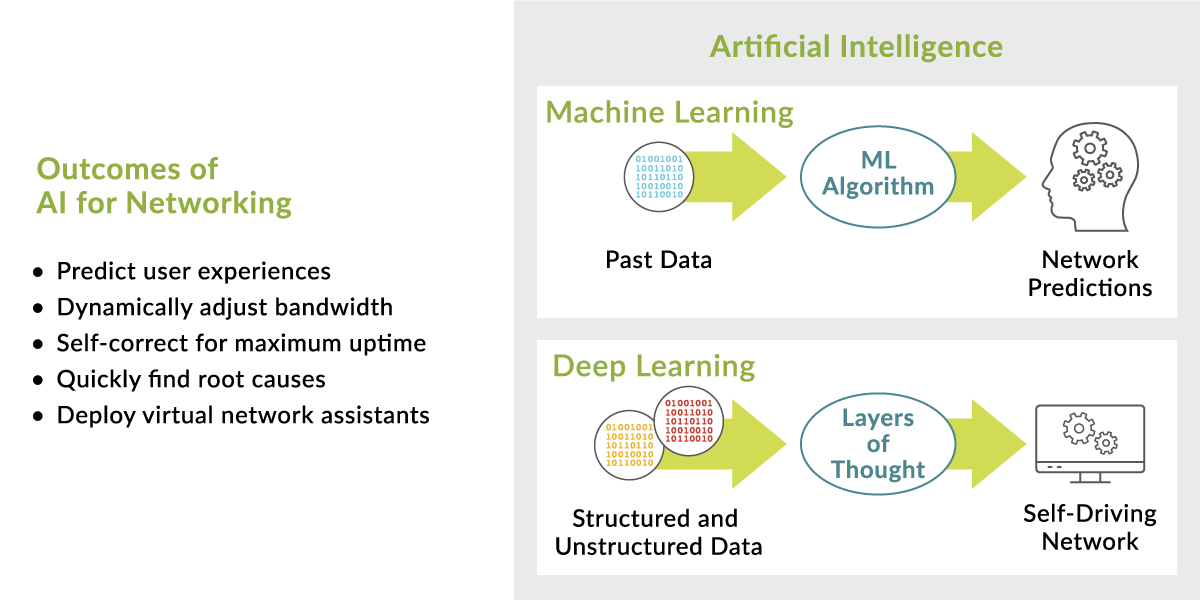
The purest definition of artificial intelligence (AI) is software that performs a task on par with a human expert. AI plays an increasingly critical role in taming complexity for growing IT networks.
The proliferation of devices, data, and people has made IT infrastructures more complex than ever to manage. Given that most IT budgets are flat or shrinking, businesses need a way to manage this complexity, and many are now looking to artificial intelligence for help.

Key AI Technologies
For AI to be successful, it requires machine learning (ML), which is the use of algorithms to parse data, learn from it, and make a determination or prediction without requiring explicit instructions. Thanks to advances in computation and storage capabilities, ML has recently evolved into more complex structured models, like deep learning (DL), which uses neural networks for even greater insight and automation. Natural language processing (NLP) is another trend that’s driven recent AI advancement, particularly in the area of the virtual home and IT assistants. NLP uses vocal and word-based recognition to make interfacing with machines easier via natural language cues and queries.


What is segment routing?
The role of AI in network environments.
Building an AI System
Without the right AI strategy, IT simply can’t keep up with today’s stringent network requirements. Here are several technology elements that an AI strategy should include.
  • Data: Any meaningful AI solution begins with massive amounts of quality data. AI continually builds its intelligence over time through data collection and analyses. The more diverse the data collected, the smarter the AI solution becomes. In the case of real-time applications involving highly distributed “edge” devices, such as IoT and mobile devices, for example, it’s crucial to collect data from every edge device in real time, then quickly process it locally or very nearby in an edge computer or the cloud using AI algorithms.
  • Domain-specific expertise: Whether helping a doctor diagnose cancer or enabling an IT administrator to diagnose wireless problems, AI solutions need labeled data based on domain-specific knowledge. These metadata chunks help the AI break the problem down into small segments that can be used to train the AI models. This task can be achieved using design intent metrics, which are structured data categories for classifying and monitoring the wireless user experience.
  • Data science toolbox: Once the problem has been divided into domain-specific chunks of metadata, this metadata is ready to be fed into the powerful world of ML and big data. Various techniques, such as supervised or unsupervised ML and neural networks, should be employed to analyze data and provide actionable insight.
  • Virtual network assistant. Collaborative filtering is an ML technique that many people experience when they select a movie on Netflix or buy something from Amazon and receive recommendations for similar movies or items. Beyond recommendations, collaborative filtering can be applied to sort through large data sets and identify and correlate those that form an AI solution to a particular problem.
In AI for networking, the virtual network assistant might function in a wireless environment as a virtual wireless expert that helps solve complex problems. Imagine a virtual network assistant that combines quality data, domain expertise, and syntax (metrics, classifiers, root causes, correlations, and ranking) to provide predictive recommendations on how to avoid problems and to offer actionable insights on how to remediate existing issues. It can learn wireless network nuances and respond to questions such as, “What went wrong?” and “Why did that happen?” These are the types of automated advances that AI is enabling.
Real-World Benefits
With AI comes a lot of hype, and that can be confusing and create false expectations. But AI for networking is very real and is already providing substantive value to companies in almost every industry. There are many examples of how AI-driven networks can help your environment.
  • Detecting time series anomalies. Many devices running on today’s networks were invented 20 years ago, and they don’t support current management messages. AI can detect time series anomalies with a correlation that allows network engineers to quickly find relationships between events that would not be obvious to even a seasoned network specialist.
  • Event correlation and root cause analysis. AI can use various data-mining techniques to explore terabytes of data in a matter of minutes. This ability lets IT departments quickly identify what network feature (for instance, OS, device type, access point, or switch) is most related to a network problem, accelerating problem resolution.
  • Predicting user experiences. Today, application bandwidth apportionment happens largely through capacity planning and manual adjustments. Soon, though, AI will be able to predict a user’s Internet performance, thus allowing a system to dynamically adjust bandwidth capacity based on which applications are in use at specific times. Manual planning will give way to predictive analysis that’s informed by historical trends and current calendar information.
  • Self-driving. AI enables IT systems to self-correct for maximum uptime and provide prescriptive actions as to how to fix problems that occur. In addition, AI-driven networks can capture and save data prior to a network event or outage, helping to speed troubleshooting.
Today, the convergence of several different technologies is enabling AI to completely disrupt the networking industry with new levels of insight and automation. AI helps lower IT costs and it assists businesses in achieving their goal of delivering the best possible IT and user experiences.
loading...