Saturday, 1 February 2020

Secure SD-WAN - Branch Platforms

The announcement of Juniper's newest hardware additions for the AI-driven enterprise makes our portfolio of CPE the most extensive for secure SD-WAN across all sizes of branch and campuses. There’s no denying the growing importance of SD-WAN for providing secure and efficient connectivity of remote sites to the cloud. Even more important is enterprises’ need to drive operational simplicity and uniformity across the branch and campus in today’s multicloud environment. For SD-WAN to be successful, the key is to satisfy the needs of today while preparing for the ones of tomorrow and beyond.

One of the core needs of increasing importance for SD-WAN is security. Traditional security solutions don’t cut in when it comes to performance, interconnectivity and flexibility, meanwhile, SD-WAN-centric solutions may offer elementary security features that will ultimately put the business at risk. The industry is at an intersection where SD-WAN features and advanced threat protection need to be designed hand-in-hand to safeguard users, applications and infrastructure. This has been our exact focus for our SD-WAN solution and, to that end, we’ve now expanded our range of CPE hardware in the WAN edge portfolio to include:

Wi-Fi Mini Physical Interface Module (mPIM): An enterprise-grade Wi-Fi card for compact locations with our SRX Series Services Gateways. It provides dual radio support of 2.4 and 5Ghz frequencies along with 802.11ac Wave 2 and 802.11ac with backward compatibility of 802.11n standards. The module is suited for remote offices, guest Wi-Fi, small office, IoT connectivity or kiosks. It is an ideal branch-in-a-box solution where one access point is sufficient.

This mPIM is manageable by CLI, JWeb or Juniper Sky Enterprise. It also offers ZTP and management via the Contrail Service Orchestration interface, as part of Juniper’s cloud-managed or on-premises Contrail SD-WAN solution.

Branch Platforms Image 1.png

SRX380: For larger branches, the SRX380 is the fastest performing CPE platform of the branch SRX300 product line. Leading features include high port density with 10G options for high on-board connectivity, increased POE+ port density for IoT devices, AE256 MACsec encryption, dual power supplies and up to four MPIM card slots for wired or wireless connectivity.

The SRX380 can be adapted to be a secure SD-WAN and next-gen firewall device. Users can add advanced threat prevention services to expand on the native next-generation firewall and UTM capabilities, IPS and AppSecure application visibility and policies.
Branch Platforms Image 2.png

NFX350: The NFX350 is a high-end universal CPE platform in the NFX Series for large branch site deployments. Built on the next generation of Intel processors, Skylake, it offers up to 7.5 Gbps IPsec performance for higher SD-WAN scale and performance, while redundant power supplies provide greater platform resiliency. It includes 8x1Gbps and 8xSFP/SFP+ ports with AES256 MACsec support for high network connectivity and WAN interfaces for LTE, DSL and SFP. Support for multiple Juniper and third-party VNFs enables customers to accelerate application deployment in an automated and scalable fashion.

The NFX350 universal CPE platform fits the bill as a secure router, SD-WAN device or next-generation firewall. Consistent with the NFX Series, users reap the many benefits of SD-WAN, but most importantly, the simplicity of automation and consolidation with the reliability of smarter security and SDN.

Branch Platforms Image 3.png

These new products meet the needs of both the top and bottom ends of all branch and campus sizes – the SRX Wi-Fi mini card for compact spaces and the SRX380 and NFX350 as top line branch CPEs. Be sure to tune in or test drive Contrail SD-WAN for free.

Thursday, 9 January 2020

Juniper Flex Program

Juniper Flex Program Overview

The Juniper Flex Program is a framework, set of policies, and tools that help unify and thereby simplify Juniper product-driven licensing and packaging.
The major components of the framework are:
  • A focus on customer segments (enterprise, service provider, and cloud) and use cases for Juniper Networks hardware and software products.
  • The introduction of subscription licenses and subscription portability for all Juniper Networks products including Junos OS, Contrail, and Juniper cloud-based services.
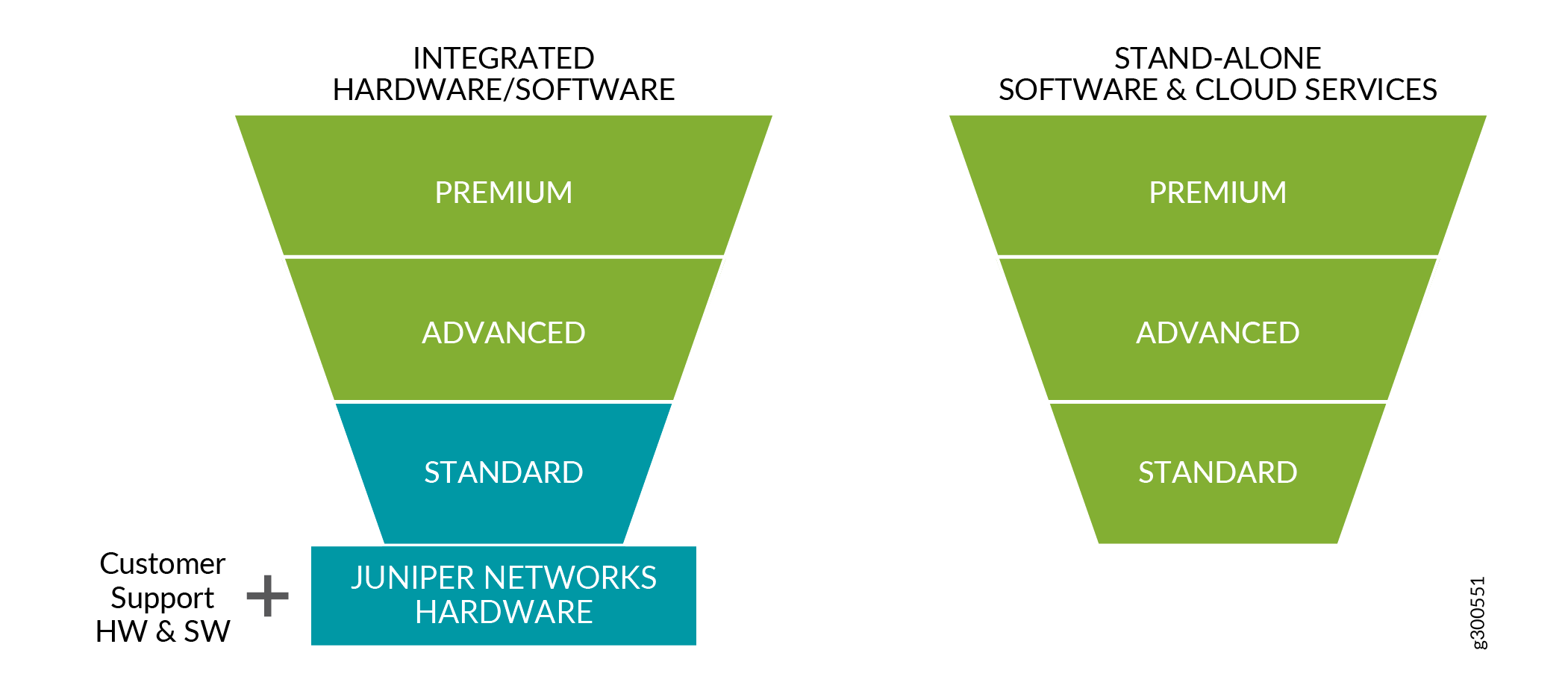
  • The introduction of a common three-tiered model (standard, advanced, and premium) for all Juniper Networks software products.

Getting Started with the Juniper Flex Program

As a customer ordering a Juniper Networks product that includes hardware, you order:
  • The hardware platform that includes the standard license.
  • The customer support package that fits your needs.
  • The advanced or premium subscription licenses, according to your use case. These subscription licenses include embedded customer support.
As a customer ordering a Juniper Networks software product, you order:
  • The standard, advanced or premium subscription license, according to your use case. These subscription licenses include embedded customer support.

Understanding the Three-Tiered Model for the Juniper Flex Program

As new hardware platforms become available with the Juniper Flex Program, you can customize your purchase using one of the following three models:
  • Standard License
    The standard license includes the hardware platform and a license to use the software with the standard feature set. Standard Return Material Authorization (RMA) policies apply with no changes in case of hardware failure. Customer support is ordered separately as you select your preferred hardware support policy and support for the standard software features. For more information about support policy, see Contact Support. The hardware platform does not require a separate license, and the software right-to-use (RTU) license is perpetual for the licensed features.
  • Advanced License
    The advanced license includes the subscription-based license to use the advanced software features. The license term is 1 year, 3 years, or 5 years. Customer support for the software features is included. These features differ by use case and platform. For example, to view the list of features for the QFX5200 switch, see QFX5200 Switch SKUs.
  • Premium License
    The premium license includes the subscription-based license to use the Junos OS software features. The license term is 1 year, 3 years, or 5 years. Customer support for the software features is included. These features differ by use case and platform. The premium license is a superset and includes all the features from the advanced license and additional features. For example, to view the list of features for the QFX5200 switch, see QFX5200 Switch SKUs.

Figure 1: Three-Tiered Model for the Juniper Flex Program
Three-Tiered Model for the Juniper
Flex Program

Understanding Subscription Licenses

All advanced and premium licenses are offered as subscriptions. Subscription licenses are available in 1 year, 3 years, or 5 years terms. After the order fulfilment, the subscription period begins after the completion of 30 days grace period.
Table 1 describes the subscription terms for purchase and number of months to use the license.
Table 1: Subscription Terms Details
Subscription Terms
Number of Months for the License
1 year
13 months
3 years
37 months
5 years
61 months
The subscription licenses include the following attributes:
  • Specific products might offer a subset of these licenses. At the end of the term, you have three options:
    • You can renew the subscription, to continue to use the features and scale granted under the license.
    • You can order a replacement subscription. For example, when an advanced subscription term expires, you might have the requirement to upgrade to the premium subscription term.
      Upgrading and downgrading the subscription models is supported. In both cases, subscription models are processed as a new order, and you might use the features and scale granted under the new license. For example, you have a 5 years subscription and you want to downgrade to 3 years subscription and the other way around.
    • You might decline to renew or purchase a replacement subscription. In this case, you may no longer use the features and scale granted under the expired subscription. You can continue to use the hardware and any software features which are granted under a perpetual license.
  • Subscription licenses include Juniper customer support for software features as part of the subscription license, unless customer support is provided by a Juniper partner directly. There is no need to order a separate customer support policy for the advanced and premium licenses.
  • Premium license includes all the features in the premium and advanced licenses.
  • Subscriptions may be ordered at any time.
  • New software features may be available over time with new software versions.
  • Subscription licenses are portable for similar devices.
  • Subscriptions are cancelable at the end of the term.
  • Renewals are not automatic.

Licensing Support on the Juniper Flex Program

The Juniper Flex Program offers the following support:
  • Portability for Subscription Licenses
    Subscription licenses are portable. This means that if you buy a new similar hardware platform, then you can port the subscription license. You can stop using the license on one hardware platform and move it to another hardware platform. This portability allows you to balance features across hardware platforms in the network without having to buy extra feature licenses.
  • Perpetual Licenses
    The standard Junos OS software shipped on the hardware platform includes a perpetual license, and this license is valid for the life of the hardware platform. The advanced and premium licenses are made available through the subscription license.
  • Feature-Based Licensing
    Some Juniper products offered add-on feature licenses. In the new licensing model, feature licenses are included in the standard, advanced, or premium licenses.
    For information about how to purchase a software license, contact your Juniper Networks sales representative at https://www.juniper.net/in/en/contact-us/.

Wednesday, 1 January 2020

Building Bridges in the Enterprise on the Journey Toward the Self-Driving Network™

Networks are meant to connect. Yet all too often network operations are disconnected, creating chasms instead of bridges for IT departments. 

This is especially true in the world of Software-Defined Networking (SDN). The goal of SDN is to bring more agility to network operations through the abstraction and automation of network control functions.  However, the industry has forced out disparate SDN solutions that tend to address specific use cases, instead of delivering a holistic solution for the entire enterprise. This has prevented most companies from realizing the full potential of SDN technology. It doesn’t have to be this way.

Juniper Networks has always offered a best-in-class SD-WAN solution with unprecedented scale, robust security and an unsurpassed array of performance options for campus, branch and public cloud WAN connections. In addition, we maximize flexibility with both on-premises and cloud-managed service options for SDN control. Today, we’ve expanded on these advantages even further with several enhancements to the company’s enterprise portfolio that bring even more flexibility, scale and cost savings to campus and branch environments and bring us one step closer to transforming enterprise IT with true AI-driven networks.

A Unified SD-Branch

We’re pleased to announce that Juniper’s SD-WAN solution has grown to also include software-defined LANs. From a common cloud-managed portal, our customers can now easily provision Juniper EX Series switches (e.g. the EX4650, EX4600, EX4300, EX3400 and EX2300 models), manage LAN fabrics and configure LAN virtualization and security policies in the same way they operate their SD-WAN environments. This automated functionality simplifies operations to reduce costs, streamline workflows and leverage the WAN and LAN network for connected security. In addition to the cloud-managed SD-WAN solution, these features will also be in the downloadable controller software for optional on-premises deployment.

Continuing on the theme of unified operations, we have also made it easier to operate Wi-Fi networks in conjunction with the SD-Branch. The same portal for SD-WAN and SD-LAN can be used to show Mist wireless access points and launch the Mist cloud for WLAN provisioning, troubleshooting, management and other day-to-day operations, including our unique wired/wireless assurance capabilities. 

FederatedManagement.png

Juniper has a unique and innovative vision of unifying wired/wireless LANs, SD-WAN and security under a common framework that delivers unparalleled automation, insight and actions to our enterprise customers.  These latest enhancements take us one step closer to that goal by expanding the breadth of our cloud offering and delivering even more deployment options for simple, seamless and secure campus and branch networks

Portfolio Breadth for Any Size Enterprise Site

While Juniper’s strength in operational simplicity is fueled by our software innovation (managed via the cloud), we also differentiate -- and excel -- with the quality and breadth of our hardware portfolio. To that end, we are pleased to announce several new additions to our CPE family.

For the more compact branch locations, Juniper is introducing a Wi-Fi card for our line of branch SRX (SRX 3xx and SRX550) next-generation firewalls and secure SD-WAN edge devices.

PortfolioBreadth.png
With the addition of the Wi-Fi card and its smart zero-touch configuration options, the branch SRX is now the perfect all-in-one device for a compact all-wireless branch, SOHO or kiosk, where only one access point is needed. Like the other SRX mini-cards, this new card is integrated into the Contrail SD-WAN solution via Junos. For users with modest network management needs, the SRX with Wi-Fi card is also supported in our cloud-based Juniper Sky Enterprise.

New to the top end in the branch SRX Series is the SRX380. It comes with several leading performance features: 1Gbps IPsec performance, four 10G ports, 16 PoE+ ports for greater wattage and density and AES256 MACsec encryption. Its four mini-card slots expand wired or wireless connectivity with, for example, the new Wi-Fi card, LAN port cards for PoE-powered IoT devices and dual-SIM LTE cards for reliable auto-failover wireless SD-WAN connectivity.

Advancing Juniper’s leadership position in universal CPE even further, new to the NFX Series, is the NFX350. The NFX350 will roll out with the latest in x86 horsepower, along with more storage and memory for secure SD-WAN supporting adjacent virtual network functions and other branch-local applications. All NFX350 devices come with eight 10G and eight 1G interfaces and, depending on the configuration, up to 2TB of storage, 128GB of RAM and 32 vCPUs. The fully loaded NFX350 will support up to 40Gbps of NG-firewalling and up to 8Gbps of IPSec.

It’s Time for the AI-Driven Enterprise

Juniper believes that an AI-driven architecture is the ultimate end game for enterprise IT. It drives simplicity which saves time and money. It increases network predictability and reliability to deliver much needed assurance. And it lays the foundation for driving more value to the business. Fortunately, Juniper has all the right elements to make this happen -- a complete product portfolio, the world’s best AI engine, a modern cloud built for agility and scale and a relentless commitment to execution.  

Not long ago, Juniper announced the integration of wired and wireless access under a common cloud and AI-engine. By unifying our SD-Branch solution under a common cloud-managed portal and federating management between LAN, WLAN and WAN environments, Juniper has taken great strides toward delivering on the ultimate promise of the AI-driven enterprise.

If you’re joining us at NXTWORK EMEA in London this week, be sure to check out breakout sessions and demos on all of the above, and don’t miss our weekly webinars on SD-WAN and Mist wireless. When you’re ready to judge for yourself, watch the demo playlist for SD-WAN and SD-LAN and sign up for a free trial of Contrail SD-WAN, soon expanding to include a guided tour of our LAN fabric management too.

Thursday, 5 December 2019

Juniper broadens SD-Branch management, switch options

Juniper has taken the wraps off new software and switches that are designed to broaden user options in deploying software-defined branch offices and enterprise networks.
The company bolstered its Contrail SD-WAN cloud package to include support for SD-LAN-specific operations, such as provisioning of new devices and managing branch office LANs.
"From one cloud portal, customers can now provision Juniper EX Series switches to manage LAN fabrics and configure LAN virtualization and security policies in the same way they operate their SD-WAN environments," wrote Manoj Leelanivas, chief product officer at Juniper, in a blog about the enhancements. "This automated functionality simplifies operations to reduce costs, streamline workflows and leverage the WAN and LAN network for connected security. In addition to the cloud-managed SD-WAN solution, these features will also be in the downloadable controller software for optional on-premises deployment."


The Contrail SD-WAN cloud offering, announced earlier this year, expanded on the company’s existing on-premise (SRX-based) and virtual (NFX-based) SD-WAN offerings to include greater expansion possibilities – up to 10,000 spoke-attached sites and support for more variants of passive redundant hybrid WAN links – and topologies such as hub and spoke, partial, and dynamic full mesh, Juniper stated.


The service brings with it Juniper’s Contrail Service Orchestration package, which secures, automates, and runs the service lifecycle across NFX Series Network Services Platforms, EX Series Ethernet Switches, SRX Series next-generation firewalls, and MX Series 5G Universal Routing Platforms. Ultimately it lets customers manage and set up SD-WANs, and now LANs, all from a single portal.


That same portal can be used to show Mist wireless access points and launch the Mist cloud for WLAN provisioning, troubleshooting, management and other day-to-day operations, including Juniper's wired/wireless assurance capabilities, Leelanivas stated. Juniper in April closed the agreement to buy wireless-gear-maker Mist for $405 million and has been incorporating the Mist technology with its own.


Mist is known for its cloud-managed, AI-based wireless service called WiFi Assurance, which measures performance and service-level metrics to make wireless networks more predictable and reliable, according to the company. Mist's cloud-based system features an AI-driven technology, called Marvis, that brings dynamic packet-capture and machine-learning technology to automatically identify, adapt and fix network issues.


Juniper recently announced Mist is expanding its cloud-based Assurance program to include wired platforms. Wired Assurance can tap into Juniper’s core network operating system, Junos, and gather telemetry data that will measure network performance for connected endpoints, including IoT devices, the company said. It also features anomaly detection to alert when there is a deviation in switch performance from baseline metrics before users know issues exist.
On the hardware side, Juniper expanded its branch switching options to include:
  • NFX350: The NFX350 family features eight 10G and eight 1G interfaces and, depending on the configuration, up to 2TB of storage, 128GB of RAM and 32 vCPUs. The fully loaded NFX350 will support up to 40Gbps of NG-firewalling and up to 8Gbps of IPSec.
  • SRX380: The SRX380 comes with several key performance features, including 1Gbps IPsec performance, four 10G ports, 16 PoE+ ports for greater wattage and density, AES256 MACsec encryption and four mini-card slots for expanded connectivity.
  • A new Wi-Fi card for branch SRX boxes that lets customers deploy Wi-Fi with zero-touch configuration alongside LTE, Ethernet and other traditional network transport options.
This story, "Juniper broadens SD-Branch management, switch options" was originally published by Network World.

Sunday, 6 October 2019

JTAC Recommended Junos Software Versions

Summary:

JTAC recommended versions of Junos software are listed to assist with determining which version of software to download and install.
This article applies to the following devices:
  • EX Series
  • M, T, and MX Series
  • ACX Series
  • QFX Series
  • SRX Series

For other Junos devices, refer to the Release Notes and the Alerts column on the Download Software pages.
Note: To be automatically notified of updates to this document, use the Subscribe link in the toolbox on the right of the page. If you do not see the Subscribe link, log in with your user account.
Important Software Upgrade Notification
Before loading a software release, Juniper recommends that you read the associated Release Notes to understand how features, functionality, fixes and any known outstanding issues will apply to your specific network and applications. A second sensible recommendation is for you to test the release in your lab whereby you emulate your topology and traffic flows where possible to further understand how your network will perform with the new release in your unique environment.
 Juniper offers optional services to aide customers in selecting and testing software releases. If interested in more information, please contact your Juniper Sales Representative to discuss offerings and pricing.

Symptoms:
For customers planning an upgrade or initial installation, JTAC recommends the Junos software versions in this article. These versions are selected using input from Juniper Engineering, customers, and analysis of field usage data.
Exceptions to this include:
  • JTAC has specifically recommended that customers use a version of Junos software that is different from what is listed.
  • You require specific features (Feature Explorer) that are available only in another version of Junos software. In this case, be sure to download the latest maintenance release.
  • Your currently installed version of Junos is working well.
  • If you use NSM, refer to the NSM & Junos Compatibility Matrix to make sure the recommended Junos software version can be managed by NSM.
     
To see the list​ of End of Engineering (EOE) and EOS (End of Support) dates for specific Junos versions, please go to the Junos Dates & Milestones page: https://support.juniper.net/support/eol/software/junos/
To see features supported per specific Junos versions, please go the Juniper Pathfinder page and navigate to "Feature Explorer": https://apps.juniper.net/home/

Solution:
To download Junos Software, go to the Software Download site and find your product.
The JTAC Recommended Junos Releases are in the tables below.
NOTE: To locate a Junos release containing an 'S' (i.e. Junos 17.3R3-S3), on the Software Download product page change the OS drop-down from Junos to Junos SR
 
Select to jump to a platform series:
 

EX Series Ethernet Switches

Platform JTAC Recommended Junos Software by Platform Last
Updated
EX2200 (See Note 3) Junos 12.3R12-S12 12 Feb 2019
EX2200-C ( See Note 3) Junos 12.3R12-S12 12 Feb 2019
EX2300 Junos 15.1X53-D591 / 18.2R3-S1 24 Sep 2019
EX2300-C Junos 15.1X53-D591 / 18.2R3-S1 24 Sep 2019
EX3200 Junos 12.3R12-S12 / 14.1X53-D40 12 Feb 2019
EX3300 ( See Note 4) Junos 12.3R12-S12 12 Feb 2019
EX3400 Junos 15.1X53-D591 / 18.2R3-S1 24 Sep 2019
EX4200  Junos 12.3R12-S12 / 15.1R7 12 Feb 2019
EX4300 Junos 18.1R3-S6 26 Jul 2019
EX4300-MP Junos 18.4R1-S3 26 Jul 2019
EX4500  Junos 12.3R12-S12 / 15.1R7 12 Feb 2019
EX4550  Junos 12.3R12-S12 / 15.1R7 12 Feb 2019
EX4600 Junos 18.1R3-S6 26 Jul 2019
EX4650 Junos 18.4R1-S3 26 Jul 2019
EX6200 Junos 12.3R12-S12 / 15.1R7 12 Feb 2019
EX8200 (See Note 2) Junos 12.3R12-S12 / 15.1R7 12 Feb 2019
EX8200-VC (XRE200) (See Note 2 ) Junos 12.3R12-S12 / 15.1R7 12 Feb 2019
EX9200  Junos 17.3R3-S5 26 Jul 2019
EX9251 Junos 18.4R1-S3 26 Jul 2019
EX9253 Junos 18.4R1-S3 26 Jul 2019
Junos Fusion Enterprise (JFE) Junos 17.4R2-S6 26 Jul 2019
Notes:
  1. It is highly recommended to refer to the Release Notes, Technical Documentation, and KB articles for any outstanding and resolved issues before making the upgrade decision. Contact JTAC if there are any queries.
  2. Please refer to TSB16758 for minimum software requirements for newer revision EX8200 linecards.
  3. Please refer TSB17138  for more details.
  4. Please refer TSB17329 .
(back to the top)


ACX Series Service Routers

Platform JTAC Recommended Junos Software by Platform Release Type Last
Updated
ACX500 Junos 17.4R2-Sx (where x=latest on download page) Standard 9 April 2019
ACX1000 Junos 17.4R2-Sx (where x=latest on download page) Standard 9 April 2019
ACX1100 Junos 17.4R2-Sx (where x=latest on download page) Standard 9 April 2019
ACX2000 Junos 17.4R2-Sx (where x=latest on download page) Standard 9 April 2019
ACX2100 Junos 17.4R2-Sx (where x=latest on download page) Standard 9 April 2019
ACX2200 Junos 17.4R2-Sx (where x=latest on download page) Standard 9 April 2019
ACX4000 Junos 17.4R2-Sx (where x=latest on download page) Standard 9 April 2019
ACX5448 Junos 18.3R1-Sx (where x=latest on download page) Standard 9 April 2019
ACX5048 / ACX5096 Junos 17.4R2-Sx (where x=latest on download page) Standard 9 April 2019

(back to the top)

M, T, PTX, and MX Series Routers

Platform JTAC Recommended Junos Software by Platform Release Type Last
Updated
M Series Junos 15.1R7/16.1R7 Standard 19 Mar 2019
T Series (all including TX, TXP, TXP-3D) Junos 15.1R7/16.1R7 Standard 19 Mar 2019
PTX Series
(except PTX10002, and 10016)
Junos 17.3R3-S1/17.4R2 Service/Standard 18 Oct 2018
PTX10002 Junos 18.2R1 Standard 18 Oct 2018
PTX10016 Junos 17.4R2 Standard 18 Oct 2018
MX Series Junos 15.1F6-S10/15.1R7
Junos 17.3R3-S2
Standard/Service 29 Nov 2018
MX 2010/2020 with MPC6/7/8/9 Junos 15.1F6-S10
Junos 17.3R3-S2
Service/Standard 29 Nov 2018
MX 2008 Series Junos 15.1F7
Junos 17.3R3-S2
Service/Standard 29 Nov 2018
MX5, MX10, MX40, MX80, MX104 Series Junos 15.1R7
Junos 17.3R3-S2
  29 Nov 2018
MX150, MX204, MX10003 Series Junos 17.4R2 Standard 18 Oct 2018
MX10008 Series Junos 18.2R1 Standard 18 Oct 2018
MX Subscriber Management(*3) Junos 18.2R3
Junos 18.4R2
Standard 23 July 2019
MX Services on MS-DPC Junos 17.3R3-S5 Standard 23 July  2019
MX Services on MS-MPC/MIC(*4) Junos 17.3R3-S5 Standard 23 July 2019
MX Virtual Chassis Junos 17.3R3-S5 Standard 23 July 2019
Virtual Route Reflector Junos 17.3R3-S5 Standard 23 July 2019
vMX / vBNG(*2) Junos 17.3R3-S5 Standard 23 July 2018
  Notes:
  1. Junos 12.3R3 and 12.3R4 are not recommended for deployment on MX5, MX10, MX40, MX80, and all MX-3D FPC. See PR896592 or contact JTAC for additional information.
  2. To obtain the specified Service Release, please contact JTAC.
  3. This includes subscriber management deployments that incorporate services such as CGNAT, etc.
  4. This release is also recommended for deployments that include both MS-MPC/MIC and MS-DPC modules within the same chassis.
  5. See KB33938 for detail information and directly downloadable links to software for M/MX/PTX/T-Series JUNOS Software
  (back to the top)

QFX Series

Platform JTAC Recommended Junos Software by Platform Last
Updated
QFX3500 / QFX3600          Junos 14.1X53-D47 26 Jul 2019
QFX5100  Junos 18.1R3-S6 26 Jul 2019
QFX5200 Junos 18.1R3-S6 26 Jul 2019
QFX5110 Junos 18.1R3-S6 26 Jul 2019
QFX5120-48Y Junos 18.4R1-S3 26 Jul 2019
QFX5210 Junos 18.1R3-S6 26 Jul 2019
QFX10002 / QFX10008 / QFX10016 Junos 17.3R3-S5 26 Jul 2019
QFX10002-60C Junos 18.1R3-S6 26 Jul 2019
EVPN-VXLAN Fabric CRB (Centrally Routed Bridging) Junos 17.3R3-S5 26 Jul 2019
EVPN-VXLAN Fabric ERB ( Edge Routed Bridging)  Junos 18.1R3-S6 26 Jul 2019
Junos Fusion Datacenter (JFD) - MC-LAG Junos 17.3R3-S3 12 Feb 2019
Junos Fusion Datacenter(JFD) - EVPN Junos 18.1R2-S2 28 Feb 2019
Qfabric (See Note 1) Junos 14.1X53-D130 30 Jul 2019

Note:

  1. Qfabric NSSU upgrade from Junos 12.2X50 to later releases is NOT recommended. Please see TSB16842 for more details.

(back to the top)


SRX Series Services Gateways

Platform JTAC Recommended Junos Software by Platform Release Type Last
Updated
vSRX Junos 15.1X49-D170(*5) Standard 16 Apr 2019
vSRX 3.0 Junos 18.4R2 Standard 30 Sep 2019
SRX100B/H Junos 12.1X46-D86 Standard 30 Sep 2019
SRX100H2 Junos 12.3X48-D85 Standard 30 Sep 2019
SRX110H Junos 12.1X46-D86 Standard 30 Sep 2019
SRX110H2 Junos 12.3X48-D85 Standard 30 Sep 2019
SRX210BE/HE Junos 12.1X46-D86 Standard 30 Sep 2019
SRX210HE2 Junos 12.3X48-D85 Standard 30 Sep 2019
SRX220H Junos 12.1X46-D86 Standard 30 Sep 2019
SRX220H2 Junos 12.3X48-D85 Standard 30 Sep 2019
SRX240B/H/B2 Junos 12.1X46-D86 Standard 30 Sep 2019
SRX240H2 Junos 12.3X48-D85 Standard 30 Sep 2019
SRX300 / SRX320 / SRX340 / SRX345 Junos 18.2R3-S1(*5) Service 30 Sep 2019
SRX550 Junos 12.3X48-D85 Standard 30 Sep 2018
SRX550HM Junos 18.2R3-S1(*5) Service 30 Sep 2019
SRX650 Junos 12.3X48-D85 Standard 30 Sep 2019
SRX1400 (*3) Junos 12.3X48-D85 Standard 30 Sep 2019
SRX1500 Junos 15.1X49-D170(*5) Standard 16 Apr 2019
SRX3400 / SRX3600 (*3) Junos 12.3X48-D85 Standard 30 Sep 2019
SRX4100 / SRX4200 Junos 15.1X49-D170(*5) Standard 16 Apr 2019
SRX4600 Junos 18.2R3-S1(*5) Service 30 Sep 2019
SRX5400 / SRX5600 / SRX5800
with SRX5K-RE3-128G, SRX5K-SCB4, SRX5K-IOC4-10G or SRX5K-IOC4-MRAT (*2)
Junos 19.3R1 Standard 30 Sep 2019
SRX5400 / SRX5600 / SRX5800
with RE-1800X4 and SRX5K-SPC3 (*2)
Junos 18.2R3-S1(*5) Service 30 Sep 2019
SRX5400 / SRX5600 / SRX5800
with RE-1800X4 (*2)
Junos 15.1X49-D170(*5) Standard 16 Apr 2019
SRX5400 / SRX5600 / SRX5800
with SRX5K-RE-13-20 (*2)(*3)
Junos 12.3X48-D75 (*1)(*4) Standard 26 Sep 2018
Notes:

  1. KB29651 - Unable to upgrade from Junos OS 12.1X46 to subsequent releases of Junos OS on SRX5400/5600/5800 platforms due to "The /cf filesystem is low on free disk space" on SRX5k RE-13-20.
  2. KB30446 - SRX Junos SRX5K Hardware / Software compatibility matrix.
  3. TSB16905 - On SRX High-End platforms, when NAT is configured, ISSU upgrade from 12.1X46-D40 to any higher releases results in loss of security policies.
  4. PR1458501 - On SRX5000 series with SRX5k RE-13-20 a software upgrade to Junos 12.3X48-D80 and higher releases may fail the pre-check due to insufficient space available on the compact flash. Workaround is to use the USB install-media or first downgrade to 12.3X48-D10 and then upgrade to the target release.
  5. Notes for upgrading from Junos 15.1X49 releases to 18.2R3 or 18.2R3 based Service Releases:
    • Junos OS upgrade from 15.1X49 directly to 18.2R3 or 18.2R3 based Service Releases is supported for all SRX platforms, except vSRX. To upgrade vSRX from 15.1X49 to higher versions, deploy a new vSRX VM.
    • ISSU is not supported when upgrading from Junos 15.1X49 to higher versions.
    • KB34945 - When Junos Space Security Director is used for managing the SRX configuration and the AppFW, IDP or UTM features are used, then when upgrading to Junos 18.2R1 or higher, the SRX configuration needs to be migrated to the new Unified Policies style and Security Director version 19.3 or higher is required.
    • When upgrading from Junos 15.1X49-D170 to Junos 18.2 releases, the following features will not be available after the upgrade:
      • GTP Inspection - GTP tunnel enhancements (SRX1500, SRX4100, SRX4200, SRX5400, SRX5600, SRX5800, and vSRX instances). This feature was introduced in 15.1X49-D140 and 18.3R1 and higher releases.
      • The following CSO / SD-WAN related features:
        • Application-based multipath support (SRX Series and vSRX)
        • Application quality of experience scaling support (SRX4100, SRX4200)
        • AppQoE support in high availability mode (SRX4100, SRX4200)
        • Application path selection based on link preference and priority (SRX300, SRX320, SRX340, SRX345, SRX550M, SRX1500, SRX4100 SRX4200, and vSRX)
        • Virtual routing and forwarding instances security features support (SRX300, SRX320, SRX340, SRX345, SRX550M, SRX1500, SRX4100, SRX4200, and vSRX)
        • VRF group in L3VPN traffic (SRX Series and vSRX)


(back to the top)

 
Modification History:
2019-09-30: Updated SRX4600, SRX5k-SPC3, SRX200, 300, 550(M), 650 series and SRX1k/3k, added new entries for the vSRX 3.0 and SRX5k RE3/IOC4/SCB4
2019-07-25: Updated MX Subscriber and MX Services information
2019-07-21: Adding "Important Software Upgrade Notification" in the beginning
2019-06-25: Add a link to KB33938 for details of M-Series, MX-Series, PTX-Series, and T-Series
2019-04-25: Corrected SRX download links
2019-04-16: Updated SRX releases
2019-04-10: Fixed QFabric and EX6200 links.
2019-03-19: Removing EOL released from M-series, and T-series
2019-03-01: Added note on how to locate Junos release versions containing an 's'
2019-02-28: Updated for several SRX platforms; added link to Feature Explorer.
2019-01-30: Fixed broken links for MX and vMX.
2018-12-19: Updated JRR for SRX5k with SPC3
2018-10-15: Updated SRX JRR versions and removed SRX210B and SRX210H platforms due to EOS reached.
2018-10-05: SRX: Move direct link to JRR version to the middle column that references JRR version
2018-10-03: SRX: Added direct link to JRR version per platform
2018-09-26: Removed J-Series platforms, due to EOS reached.
2018-06-25: Updated releases for ACX, MX and vMX platforms.
2018-05-17: Corrected link to SRX4600's software download page.
2018-05-15: Updated the recommended release for ACX5048 / ACX5096
2017-11-16: Updated VRR to 16.2
2017-04-18: Added jump links for quick access to platform series sections

Monday, 9 September 2019

5 Tips for Designing a Successful Cloud Migration Strategy

Migrating your data to the cloud can be a daunting task if your enterprise doesn’t adequately prepare for it. Cloud migration can be a lengthy process, and it requires a large time and financial investment from your company to fulfill. Without a well thought-out migration strategy in place, your business will have a tough time adopting the cloud into your infrastructure.
How do you design a successful cloud migration strategy? What are the key factors of cloud migration that this strategy should address? Most importantly, how does your business achieve the cloud migration goals you’ve set out? Below, we list several tips for creating and executing a successful cloud migration strategy.

Understand why you want to migrate to the cloud

First things first: why do you want to move your enterprise’s data and workflows to the cloud? The cloud is an exciting technology that businesses want to take advantage of. However, without a clear reason behind adopting the cloud into your infrastructure, your cloud migration is destined to crash and burn. Your enterprise needs to understand what it seeks to accomplish by moving to the cloud. Whether it be to reduce costs or to take advantage of cloud-based services, your cloud goals allow you to design your migration strategy around your specific business needs.

Know what data should be included in your migration strategy

Your business doesn’t necessarily need to move all of its data onto the cloud. If you want to take advantage of the computing power the cloud provides to build powerful applications and solutions, for example, you won’t need to migrate your legacy business data over. Alternatively, businesses that want to use the cloud for data storage must consider which bits of data should remain on-premise and which should be exclusively in the cloud.

Plan your cloud migration in stages

Fully migrating your data to the cloud can take a long time, especially for enterprises that store a ton of data in their infrastructure. Because it takes so long to move this data, your migration strategy should move data onto the cloud in stages. Non-essential data should be migrated first because you’ll likely be unfamiliar with the cloud environment you’re migrating to. If you attempt to migrate mission-critical or sensitive data first and something goes wrong (such as accidentally leaking your data), it can be costly to your business.

Evaluate your migration strategy after a while

After you’ve started migrating data over, it’s a good idea to look at your migration strategy and see if it’s working for your company. This evaluation can include how much of the migration is complete and when you expect it to be finished if you work at your current pace. Examining your cloud migration strategy can help your enterprise understand how well your company is achieving its cloud goals.

Keep your employees up to speed

When you move to the cloud, you’ll need to train your workforce on an entirely new deployment. It’s fair to assume that many of your staff do not use cloud solutions and environments. They can be a roadblock for successful cloud operation, especially if they aren’t familiar with your cloud migration plan. Make sure that your employees are familiar with your cloud migration strategy and what your short-term and long-term goals are.

Saturday, 10 August 2019

Junos Evolves for the Cloud Era

Juniper Networks has a distinguished record as a disruptor and a change leader in the networking industry. 

Juniper technologies helped fuel the rapid growth of the internet in the early 2000s by decoupling the data-plane of an IP router from its control plane and creating routers that moved IP traffic many times faster and more economically than before. Junos OS, the software brain of Juniper routers, switches and security appliances, integrated market-leading innovation into an open-source Unix OS, namely FreeBSD. Among other things, Junos introduced innovative ways of managing network devices, leading to standardized modeling languages and protocols, such as YANG and NETCONF, laying the foundation for programmability and automation that the industry has broadly adopted today.

More recent innovations include virtualization, node slicing and the ability to support 3rd-party white box hardware, to name a few. Furthermore, Juniper consistently maintains a strong presence in standards bodies evangelizing open programmability to ensure freedom of choice for the entire networking industry.

Junos-Evolved-Blog.png  

The networking industry is in transition again with cloud, 5G and SDN creating new challenges, as well as opportunities. These, in turn, require new network architecture approaches. Juniper’s engineering team has been busy designing software infrastructure to enable new paradigms such as scale-out architectures, disaggregated and cloud-native functions, lean and open-source compliant OS stacks, as well as the ability to offer much greater availability, programmability, visibility, feature development and deployment agility for operational efficiencies in traditional deployment models. This effort has produced a new generation of infrastructure evolution within Junos, sometimes referred to as “Junos OS Evolved,” that imbues powerful capabilities to the overall Junos operating system while maintaining One Junos experience. 

New Capabilities
The latest Junos release incorporates the following capabilities:
  • Linux OS and Linux native application components enable the user to leverage the integrated tooling and operational mechanisms of the rich Linux open-source community
  • Logically centralized state database and a publish/subscribe state distribution system for advanced observability, troubleshooting and remediation
  • Model representation of the entire config and state, enabling machine-driven automation
  • Full software modularity with strong fault isolation boundaries for higher availability
  • Containerized OS components with patching and upgrade capability for availability and run-time upgrades of on-device software, as well as the ability to run software decoupled from hardware in cloud-native environments
  • Native support for 3rd-party software agents enabling easy customization
  • Next generation data-plane software sub-system with a programmable and open API
  • Powerful and intrinsic distributed system facility for enabling new paradigms such as distributed chassis and cloud-hosted control planes
As software evolves, especially when it is deployed on hundreds of thousands of devices around the globe, an ecosystem of operational experiences, best practices, management tools and trust also evolves around it. At Juniper, we realize the importance of preserving the One Junos experience by keeping the following aspects consistent across our releases:
  • System and application data models and interfaces via SNMP, CLI, NETCONF, Streaming Telemetry, etc.
  • Programmability via our Juniper Extension Toolkit (JET) Control Plane APIs
  • Forwarding plane API via Openflow, P4, Advanced Forwarding Toolkit (AFT)
  • Key control and management plane applications

Junos OS Evolved brings powerful and innovative new infrastructure capabilities. It enables the next generation of network architecture deployments with the goal of meeting and exceeding the needs and expectations of our customers well into the future.
loading...