- Juniper Networks BTI proNX Service Manager Software
- Juniper Networks JSA Series User Behavior Analytics prior to version 4.1.14 see https://www.ibm.com/support/pages/node/6526640 for further details.
- Juniper Networks Junos Space Network Management Platform when OpenNMS has been enabled.
- Juniper Networks NorthStar Controller / NorthStar Planner
- Juniper Networks Paragon Pathfinder
- 21 version 21.1, 21.2 and later versions.
- Juniper Networks Paragon Planner
- 21 version 21.1, 21.2 and later versions.
Wednesday, 1 December 2021
Junos following products are vulnerable to the issue described in CVE-2021-44228

Monday, 1 November 2021
Junos : request chassis cluster failover redundancy-group
content_copy zoom_out_map
request chassis cluster failover node node-number redundancy-group redundancy-group-number
Description
For chassis cluster configurations,
initiate manual failover in a redundancy group from one node to the
other, which becomes the primary node, and automatically reset the
priority of the group to 255. The failover stays in effect until the
new primary node becomes unavailable, the threshold of the redundancy
group reaches 0, or you use the request chassis cluster failover
reset command.
After a manual failover,
you must use the request chassis cluster failover reset command before initiating another failover.
Options
nodenode-number—Number of the chassis cluster node to which the redundancy group fails over.Range: 0 or 1
redundancy-groupgroup-number—Number of the redundancy group on which to initiate manual failover. Redundancy group 0 is a special group consisting of the two Routing Engines in the chassis cluster.Range: 0 through 255
Sunday, 3 October 2021
Juniper : SD-WAN
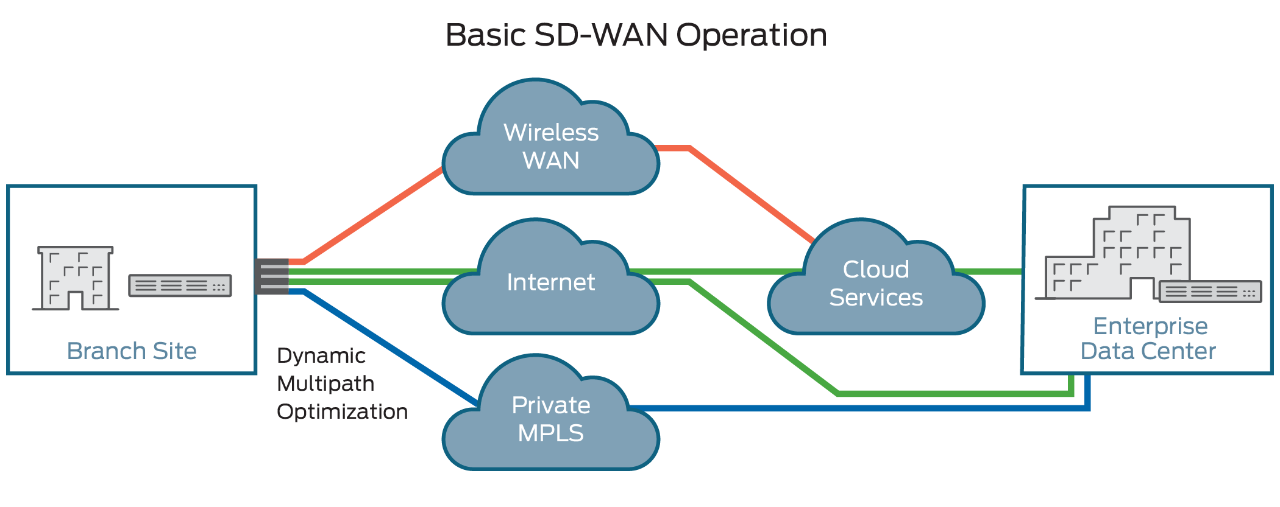
Software-defined wide-area networking (SD-WAN) is an automated, programmatic approach to managing enterprise network connectivity and circuit costs. It extends software-defined networking (SDN) into an application that businesses can use to quickly create a smart hybrid WAN.
Consisting of business-grade IP VPN, broadband Internet, and wireless services, SD-WAN enables you to cost-efficiently manage applications, particularly in the cloud. Traffic is automatically and dynamically forwarded across the most appropriate and efficient WAN path based on network conditions, application traffic security and quality-of-service (QoS) requirements, and circuit cost. You can set the routing policies.
SD-WAN Benefits
Businesses are rapidly adopting SD-WAN technology because of its comprehensive financial and operational benefits.
- Lowers WAN OpEx, CapEx, and overall total cost of ownership.
- Provides greater business agility and responsiveness to keep pace with IT innovations.
- Supports multiple, secure, high-performance connections, eliminating backhaul penalties imposed by MPLS networks.
- Improves performance by enabling load sharing across connections and adjusting traffic flows based on network conditions.
- Supports the automated provisioning of, and changes to, premium network services such as VPNs, firewalls, security, WAN optimization, and application delivery control.
- Supports zero touch provisioning (ZTP).
- Improves network security by encrypting WAN traffic and segmenting the network to minimize damage if breaches occur.
Problems Addressed by SD-WAN
Managing the WAN traditionally has been one of the most expensive and rigid aspects of running an enterprise network. SD-WAN eases this burden by proactively responding to real-time network conditions. It uses programmable network devices that you can modify remotely and through dynamic best-path routing, both of which improve cost, agility, and performance.
SD-WAN Uses and Functions
SD-WAN software running on CPE (customer premises equipment) monitors the conditions of all public and private-line services and determines how to route each type of application traffic. For instance, the default might be to send voice-over-IP (VoIP) traffic over an MPLS VPN service. However, if the MPLS connection becomes congested, the SD-WAN might switch that traffic over to a broadband Internet or 4G LTE wireless circuit. In this way, the SD-WAN enables automatic load balancing and network congestion management for best performance and least-cost effective routing.
Sunday, 5 September 2021
Junos Software Versions - Suggested Releases to Consider and Evaluate
Summary:
Solution:
To download Junos Software, go to the Software Download site and find your product.
Suggested Junos Software Versions for your consideration and evaluation are listed in the tables below.
NOTE: To locate a Junos release containing an 'S' (i.e. Junos 17.3R3-S3), on the Software Download product page change the OS drop-down from Junos to Junos SR
Select to jump to a platform series:
EX Series Ethernet Switches
| Platform | Junos Software by Platform | Last Updated |
|---|---|---|
| EX2200 (See Note 3) | Junos 12.3R12-S15 | 09 Mar 2020 |
| EX2200-C ( See Note 3) | Junos 12.3R12-S15 | 09 Mar 2020 |
| EX2300 | Junos 18.2R3-Latest Service Release / 20.2R3 or Latest Service Release | 21 Apr 2021 |
| EX2300-C | Junos 18.2R3-Latest Service Release / 20.2R3 or Latest Service Release | 21 Apr 2021 |
| EX3200 | Junos 12.3R12-S15 / 14.1X53-D40 | 09 Mar 2020 |
| EX3300 ( See Note 4) | Junos 12.3R12-S15 | 09 Mar 2020 |
| EX3400 | Junos 18.2R3-Latest Service Release / 20.2R3 or Latest Service Release | 21 Apr 2021 |
| EX4200 | Junos 12.3R12-S15 / 15.1R7-S6 | 09 Mar 2020 |
| EX4300 | Junos 18.4R2-Latest Service Release / 20.2R3 or Latest Service Release | 21 Apr 2021 |
| EX4300-MP | Junos 18.4R2-Latest Service Release / 20.2R3 or Latest Service Release | 21 Apr 2021 |
| EX4400 | Junos 21.1R2 | 23 Aug 2021 |
| EX4500 | Junos 12.3R12-S15 / 15.1R7-S6 | 09 Mar 2020 |
| EX4550 | Junos 12.3R12-S15 / 15.1R7-S6 | 09 Mar 2020 |
| EX4600 | Junos 18.4R2-Latest Service Release / 20.2R3 or Latest Service Release | 21 Apr 2021 |
| EX4650 | Junos 18.4R2-Latest Service Release / 20.2R3 or Latest Service Release | 21 Apr 2021 |
| EX6200 | Junos 12.3R12-S15 / 15.1R7-S6 | 09 Mar 2020 |
| EX8200 (See Note 2) | Junos 12.3R12-S15 / 15.1R7-S6 | 09 Mar 2020 |
| EX8200-VC (XRE200) (See Note 2 ) | Junos 12.3R12-S15 / 15.1R7-S6 | 09 Mar 2020 |
| EX9200 | Junos 18.4R2-Latest Service Release / 20.2R3 or Latest Service Release | 21 Apr 2021 |
| EX9251 | Junos 18.4R2-Latest Service Release / 20.2R3 or Latest Service Release | 21 Apr 2021 |
| EX9253 | Junos 18.4R2-Latest Service Release / 20.2R3 or Latest Service Release | 21 Apr 2021 |
| Junos Fusion Enterprise (JFE) | Junos 18.4R2-Latest Service Release / 20.2R3 or Latest Service Release | 21 Apr 2021 |
Notes:
- It is highly recommended to refer to the Release Notes, Technical Documentation, and KB articles for any outstanding and resolved issues before making the upgrade decision. Contact JTAC if there are any queries.
- Please refer to TSB16758 for minimum software requirements for newer revision EX8200 linecards.
- Please refer TSB17138 for more details.
- Please refer TSB17329 .
ACX Series Service Routers
| Platform | Junos Software by Platform | Release Type | Last Updated |
|---|---|---|---|
| ACX500 | Junos 19.4R3-S3 Junos 20.2R3 |
Standard | 02 Jun 2021 |
| ACX710 | Junos 20.2R2-S2 | Standard | 02 Jun 2021 |
| ACX1000 | Junos 19.4R3-S3 Junos 20.2R3 |
Standard | 02 Jun 2021 |
| ACX1100 | Junos 19.4R3-S3 Junos 20.2R3 |
Standard | 02 Jun 2021 |
| ACX2000 | Junos 19.4R3-S3 Junos 20.2R3 |
Standard | 02 Jun 2021 |
| ACX2100 | Junos 19.4R3-S3 Junos 20.2R3 |
Standard | 02 Jun 2021 |
| ACX2200 | Junos 19.4R3-S3 Junos 20.2R3 |
Standard | 02 Jun 2021 |
| ACX4000 | Junos 19.4R3-S3 Junos 20.2R3 |
Standard | 02 Jun 2021 |
| ACX5448 | Junos 20.2R3 | Standard | 02 Jun 2021 |
| ACX5048 / ACX5096 | Junos 20.2R3 | Standard | 02 Jun 2021 |
(back to the top)
M, T, PTX, and MX Series Routers
| Platform | Junos Software by Platform | Last Updated |
|---|---|---|
| M Series | Junos 15.1R7 | 29 Jan 2020 |
| T Series (all including TX, TXP, TXP-3D) | Junos 15.1R7 Junos 16.1R7 |
21 Apr 2020 |
| PTX Series (See KB33938 for detail) (Except ones listing below) |
Junos 17.3R3-S10 Junos 17.4R2-S10 Junos 18.2R3-S8 Junos 19.2R1-S4 Junos 19.3R3-S3 |
10 Aug 2021 |
| PTX10001-36MR | Junos Evolved 20.4R2-EVO | 11 May 2021 |
| PTX10003 | Junos Evolved 20.4R2-EVO | 11 May 2021 |
| PTX10004 | Junos Evolved 20.4R2-EVO | 11 May 2021 |
| PTX10008/16 with FAN2/AC2/DC2 Components (Do not use if deploy - JNP10008-SF3) |
Junos 19.2R1-S4 | 21 Apr 2020 |
| PTX10008 with PTX10K-LC1201-36CD and JNP100008-SF3 JNP10K-RE1-E |
Junos Evolved 20.4R2-EVO | 11 May 2021 |
| PTX10008 with PTX10K-LC1202 and JNP100008-SF3 JNP10K-RE1-E |
Junos Evolved 20.4R2-EVO | 11 May 2021 |
| MX Series | Junos 17.3R3-S10 Junos 18.4R2-S5 Junos 19.3R3-S2 Junos 19.4R3-S3 |
01 Jun 2021 |
| MX Series with MX-SPC3 | Junos 19.4R3-S3 | 02 Jun 2021 |
| MX 2008/2010/2020 | Junos 17.3R3-S10 Junos 17.4R3-S3 (MIC-MACSEC) Junos 20.1R2-S1 (MPC11) |
11 Nov 2020 |
| MX240/480/960 with SCBE3 | Junos 19.3R3-S2 Junos 19.4R3-S3 Junos 20.2R3-S1 |
01 Jun 2021 |
| MX240/480/960 with MPC10E | Junos 19.4R3-S3 Junos 20.2R3-S1 |
01 Jun 2021 |
| MX5, MX10, MX40, MX80, MX104 Series | Junos 17.3R3-S10 Junos 19.4R3-S3 |
01 Jun 2021 |
| MX150, MX204, MX10003 Series | Junos 19.4R3-S3 Junos 20.2R3-S1 Junos 20.4R2 |
01 Jun 2021 |
| MX10008 Series | Junos 19.3R3-S2 Junos 19.4R3-S3 |
01 Jun 2021 |
| MX10016 Series | Junos 19.3R3-S2 Junos 19.4R3-S3 |
12 Nov 2021 |
| MX Subscriber Management(*1) | Junos 19.4R3-S3 | 02 Jun 2021 |
| MX Services on MS-DPC | Junos 17.3R3-S3 | 23 July 2019 |
| MX Services on MS-MPC/MIC(*3) | Junos 19.4R3-S3 | 02 Jun 2021 |
| vMX / vBNG(*2) | Junos 19.4R3-S3 | 02 Jun 2021 |
Notes:
- This includes subscriber management deployments that incorporate services such as CGNAT, etc.
- See KB33938 for detail information and directly downloadable links to software for M/MX/PTX/T-Series JUNOS Software
- Recently released hardware may require a software version newer than listed above. Please use the latest Service Release for the required JUNOS software version
- Due to feature parity recommended from Product Line Management
- MPC11 is not supported in Junos 19.4
NFX Series Network Services Platform
| Platform | Junos Release | Software Architecture | Release Type | Last Updated |
|---|---|---|---|---|
| NFX150 | Junos 20.2R2 | nfx-3 | Service | 08 Jun 2021 |
| NFX250 | Junos 18.4R3 | nfx-2 | Standard | 11 May 2020 |
| NFX250-NG | Junos 20.2R2 | nfx-3 | Standard | 08 Jun 2021 |
| NFX350 | Junos 20.2R2 | nfx-3 | Standard | 08 Jun 2021 |
(back to the top)
QFX Series
| Platform | Junos Software by Platform | Last Updated |
|---|---|---|
| QFX3500 / QFX3600 | Junos 14.1X53-D54 | 26 May 2020 |
| QFX5100 | Junos 18.4R2-S5 and subsequent service releases / 20.2R3 | 01 Jun 2021 |
| QFX5200 | Junos 18.4R2-S5 and subsequent service releases / 20.2R3 | 01 Jun 2021 |
| QFX5200-EVO | Junos Evolved 18.3R1-EVO | 19 Aug 2021 |
| QFX5110 | Junos 18.4R2-S5 and subsequent service releases / 20.2R3 | 01 Jun 2021 |
| QFX5120-32C | Junos 19.1R3-S2 and subsequent service releases / 20.2R3 | 01 Jun 2021 |
| QFX5120-48Y | Junos 18.4R2-S5 and subsequent service releases / 20.2R3 | 01 Jun 2021 |
| QFX5120-48T | Junos 20.2R3 | 01 Jun 2021 |
| QFX5210 | Junos 18.4R2-S5 and subsequent service releases / 20.2R3 | 01 Jun 2021 |
| QFX10002 / QFX10008 / QFX10016 | Junos 18.4R2-S5 and subsequent service releases / 20.2R3 | 01 Jun 2021 |
| QFX10002-60C | Junos 19.1R3-S2 and subsequent service releases / 20.2R3 | 01 Jun 2021 |
| EVPN-VXLAN Fabric CRB (Centrally Routed Bridging) | Junos 18.4R2-S5 and subsequent service releases / 20.2R3 | 01 Jun 2021 |
| EVPN-VXLAN Fabric ERB ( Edge Routed Bridging) | Junos 18.4R2-S5 and subsequent service releases / 20.2R3 | 01 Jun 2021 |
| IP-Fabric ( QFX10K and QFX5K) | Junos 18.4R2-S5 and subsequent service releases / 20.2R3 | 01 Jun 2021 |
| VCF-QFX5110 | Junos 17.4R2 latest service release/ 20.2R3 | 01 Jun 2021 |
| VCF-QFX5100 | Junos 17.4R2 latest service release / 20.2R3 | 01 Jun 2021 |
| VC-QFX5100 | Junos 17.4R2 latest service release / 20.2R3 | 01 Jun 2021 |
| VC-QFX5110 | Junos 17.4R2 latest service release / 20.2R3 | 01 Jun 2021 |
| VC-QFX5120 | Junos 20.2R3 | 01 Jun 2021 |
| VC-QFX5120-32C | Junos 20.4R2 and subsequent service releases | 01 Jun 2021 |
| VC-QFX5200 | Junos 17.4R2 latest service release / 20.2R3 | 01 Jun 2021 |
| MC-LAG (QFX5K) | Junos 20.2R3 | 01 Jun 2021 |
| MC-LAG (QFX10K) | Junos 20.2R3 | 01 Jun 2021 |
| Junos Fusion Datacenter (JFD) - MC-LAG | Junos 17.3R3-S3 | 12 Feb 2019 |
| Junos Fusion Datacenter(JFD) - EVPN | Junos 18.1R2-S2 | 28 Feb 2019 |
| Qfabric (See Note 1) | Junos 14.1X53-D130 | 30 Jul 2019 |
Note:
-
Qfabric NSSU upgrade from Junos 12.2X50 to later releases is NOT recommended. Please see TSB16842 for more details.
SRX Series Services Gateways
| Platform | Junos Software by Platform | Release Type | Last Updated |
|---|---|---|---|
| vSRX | Junos 19.4R3-S1 | Service | 06 Jan 2021 |
| vSRX 3.0 | Junos 19.4R3-S1 | Service | 06 Jan 2021 |
| SRX100H2 / SRX110H2 / SRX210HE2 / SRX220H2 / SRX240H2 | Junos 12.3X48-D105 | Standard | 16 Oct 2020 |
| SRX300 / SRX320 / SRX340 / SRX345 | Junos 19.4R3-S1 | Service | 06 Jan 2021 |
| SRX380 | Junos 20.2R3 | Standard | 26 Apr 2021 |
| SRX550 | Junos 12.3X48-D105 | Standard | 16 Oct 2020 |
| SRX550HM | Junos 19.4R3-S1 | Service | 06 Jan 2021 |
| SRX650 | Junos 12.3X48-D105 | Standard | 16 Oct 2020 |
| SRX1400 | Junos 12.3X48-D105 | Standard | 16 Oct 2020 |
| SRX1500 | Junos 20.2R3 | Standard | 26 Apr 2021 |
| SRX3400 / SRX3600 | Junos 12.3X48-D105 | Standard | 16 Oct 2020 |
| SRX4100 / SRX4200 | Junos 19.4R3-S1 | Service | 06 Jan 2021 |
| SRX4600 | Junos 19.4R3-S1 | Service | 06 Jan 2021 |
| SRX5400 / SRX5600 / SRX5800 with SRX5K-RE3-128G (*1) |
Junos 19.4R3 | Standard | 04 May 2021 |
| SRX5400 / SRX5600 / SRX5800 with RE-1800X4 (*1) |
Junos 19.4R3 | Standard | 04 May 2021 |
| SRX5400 / SRX5600 / SRX5800 with SRX5K-RE-13-20 (*1) |
Junos 12.3X48-D105(*2) | Standard | 16 Oct 2020 |
Notes:
-
KB30446 - SRX Junos SRX5K Hardware / Software compatibility matrix.
-
TSB17655 - On SRX5000 series with SRX5k RE-13-20 a software upgrade to Junos release 12.3X48-D80, D85 or D90 may fail the pre-check due to insufficient space available on the compact flash.
-
Junos OS upgrade from 18.4R3 or 18.4R3 based Service Releases directly to 19.4R3 or 19.4R3 based Service Releases is supported for all SRX platforms.
-
Notes for upgrading from Junos 15.1X49 releases to 19.4R3 or 19.4R3 based Service Releases:
-
Junos OS upgrade from 15.1X49 directly to 19.4R3 or 19.4R3 based Service Releases is supported for all SRX platforms (ISSU is not supported). Note: PR1572963 - Junos OS upgrade from 15.1X49 directly to 19.4R3-S2 fails on SRX5400 / SRX5600 / SRX5800.
-
In case you would need to rollback or downgrade from 19.4 to the 15.1X49 release on SRX1500, SRX4100/4200, SRX5k or vSRX, all files on the device may be lost. Hence it is important to backup the relevant files (configuration, license-keys etc) before the upgrade and have console access during the upgrade and during a potential rollback if required.
-
For vSRX the following limitations apply when upgrading from 15.1X49 directly to 19.4R3 or 19.4R3 based Service Releases:
-
The file system mounted on /var usage must be below 14% of capacity.
Check this with
root@vsrx> show system storage | match " /var$"

			/dev/vtbd1s1f 2.7G 82M 2.4G 3% /var
Note: The CLI command ‘request system storage cleanup’ may help reach that percentage if needed -
The Junos upgrade image must be placed in the directory /var/host-mnt/var/tmp/
request system software add /var/host-mnt/var/tmp/ -
It is recommended to deploy a new vSRX VM instead of performing a Junos upgrade. That also gives the option to move from vSRX to the newer and more recommended vSRX 3.0.
-
-
ISSU is not supported when upgrading from Junos 15.1X49 to any higher versions.
-
KB34945 - When Junos Space Security Director is used for managing the SRX configuration and the AppFW, IDP or UTM features are used, then when upgrading to Junos 18.2R1 or higher, the SRX configuration needs to be migrated to the new Unified Policies style and Security Director version 19.3 or higher is required.
-
Starting with Junos OS Release 17.3, when you upgrade from Junos OS Release 15.1X49 to Junos OS Release 17.3 or higher, or downgrade from Junos OS Release 17.3 or higher to Junos OS Release 15.1X49, you must update the IPS signature package by downloading and installing the IPS signature package update.
-
Sunday, 1 August 2021
Juniper Sky Enterprise
As an IT professional, it’s hard to keep up with the pace of innovation when costly training sessions and talent shortages have become a way of life. Adding to that, the pace of innovation and cybersecurity attacks are moving faster than ever, leading to increased risk of threats.
Juniper Sky Enterprise makes cloud network management simple and quick for IT teams of all sizes and experience levels deploying Juniper switching and security devices. It's easier than ever to use cloud-managed switches and cloud-managed firewalls.
Key Features
- Centralize network management on one dashboard. Easily deploy, configure, and manage switches and firewalls within hours for immediate visibility and control. You can reduce management costs by accelerating time to deployment.
- Strengthen cybersecurity by seeing threats in real time. When you integrate Sky Enterprise with Juniper’s security products, you also get state-of-the art monitoring and reporting.
- Eliminate software maintenance cycles as a cloud-based service to ease network administration and costs.
- Integrate with other systems for multiplatform and multivendor architectures.
Features + Benefits
Enterprise Management Software as a Service
Run in an elastic, multitenant, secure, and reliable cloud infrastructure in SSAE16 SOC-1/2/3-compliant data centers. The highest levels of physical and infrastructure security keep data private—no user traffic passes through the Juniper Sky Enterprise system.
Intuitive, Centralized Dashboard
Perform day-to-day management of your EX Series and SRX Series devices centrally from one intuitive, web-based portal using simplified workflows. Use the centralized dashboard for managing, monitoring, reporting, and securing your enterprise.
Quick Setup and Installation
Use Zero Touch Provisioning (ZTP) for fast, simple deployment of cloud-managed switches and cloud-managed firewalls. A simple device replacement and renewal process helps you avoid costly truck rolls.
Cyberthreat Visibility and Protection
Get real-time visibility into the threats and risks the SRX Series device has detected and mitigated. With advanced reporting for Juniper AppSecure, UTM, and Juniper Advanced Threat Prevention, you gain granular insights into the network.
Switch Infrastructure Management
Simplify workflows to configure and manage switch interfaces, VLANs, and routes. Easily monitor switch resources and capacity. Gain access to full Power over Ethernet (PoE) settings to enable, disable, and monitor PoE-connected devices. Visualize Virtual Chassis configurations.
General Administration
Easily administer new user accounts with two-factor authentication and role-based access control (RBAC). An audit change log provides additional security.
Daily Operations and Maintenance Support
Perform bulk updates to a range of devices and track the changes across the network. Track device inventory and schedule routine configuration backups across your devices. You can also run live packet capture for deep-dive traffic flow inspections to help manage network risk.
Software Image Management and Upgrade
Centralize the distribution and deployment of Junos operating system. Upgrade hundreds of devices with minimal effort and receive a detailed upgrade report when complete.
Sunday, 18 July 2021
Juniper Networks vSRX Virtual Firewall maintains ICSA Labs Firewall Certification
Following the latest ICSA Labs firewall security certification
test cycle, the Juniper Networks vSRX Virtual Firewall satisfied the
complete set of ICSA Labs baseline and corporate security testing
requirements. Having met all of the testing requirements in both
criteria standards, the tested vSRX Virtual Firewall remained ICSA Labs
Firewall Certified.
Read the full report here.
Tuesday, 1 June 2021
Junos Software Versions - Suggested Releases to Consider and Evaluate
SRX Series Services Gateways
| Platform | Junos Software by Platform | Release Type | Last Updated |
|---|---|---|---|
| vSRX | Junos 19.4R3-S1 | Service | 06 Jan 2021 |
| vSRX 3.0 | Junos 19.4R3-S1 | Service | 06 Jan 2021 |
| SRX100H2 / SRX110H2 / SRX210HE2 / SRX220H2 / SRX240H2 | Junos 12.3X48-D105 | Standard | 16 Oct 2020 |
| SRX300 / SRX320 / SRX340 / SRX345 | Junos 19.4R3-S1 | Service | 06 Jan 2021 |
| SRX380 | Junos 20.2R3 | Standard | 26 Apr 2021 |
| SRX550 | Junos 12.3X48-D105 | Standard | 16 Oct 2020 |
| SRX550HM | Junos 19.4R3-S1 | Service | 06 Jan 2021 |
| SRX650 | Junos 12.3X48-D105 | Standard | 16 Oct 2020 |
| SRX1400 | Junos 12.3X48-D105 | Standard | 16 Oct 2020 |
| SRX1500 | Junos 20.2R3 | Standard | 26 Apr 2021 |
| SRX3400 / SRX3600 | Junos 12.3X48-D105 | Standard | 16 Oct 2020 |
| SRX4100 / SRX4200 | Junos 19.4R3-S1 | Service | 06 Jan 2021 |
| SRX4600 | Junos 19.4R3-S1 | Service | 06 Jan 2021 |
| SRX5400 / SRX5600 / SRX5800 with SRX5K-RE3-128G (*1) |
Junos 19.4R3 | Standard | 04 May 2021 |
| SRX5400 / SRX5600 / SRX5800 with RE-1800X4 (*1) |
Junos 19.4R3 | Standard | 04 May 2021 |
| SRX5400 / SRX5600 / SRX5800 with SRX5K-RE-13-20 (*1) |
Junos 12.3X48-D105(*2) | Standard | 16 Oct 2020 |
Subscribe to:
Posts (Atom)